
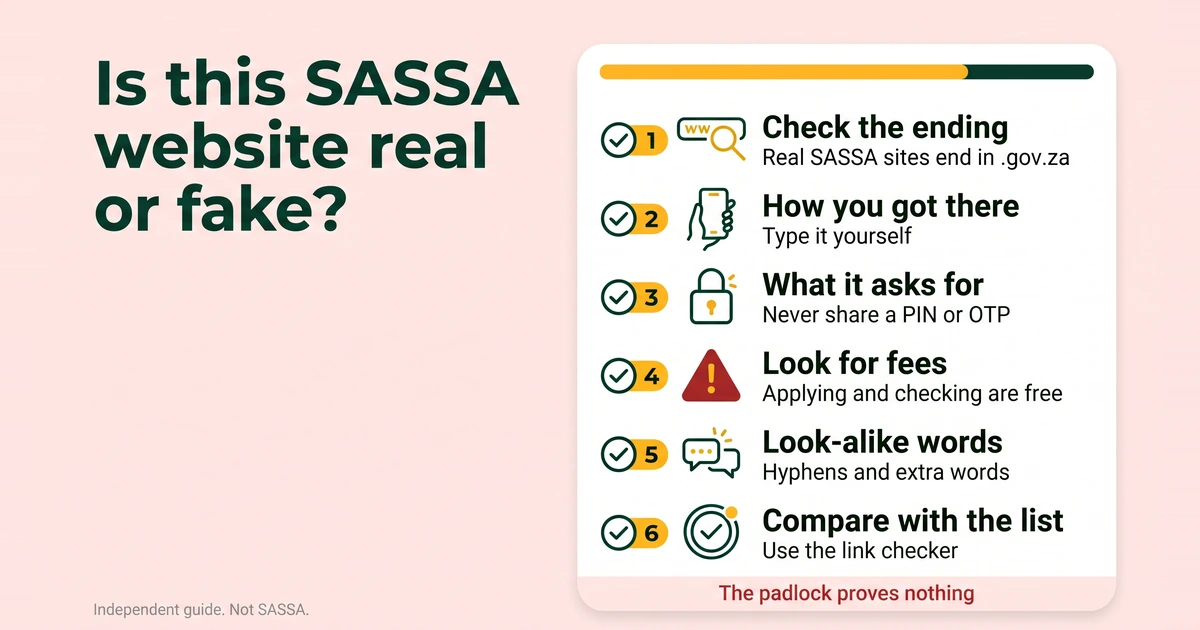
A fake SRD page can look identical to the real one. What it cannot copy is the address, and it cannot pass all ten checks below. Work through them in order, and stop at the first one that fails.
Every address ending in .example in this post is invented to show a pattern. None of them is a real site.
The 10-point checklist
The first four checks look at the address and how you arrived. The next four look at what the page does and how it feels. The last two give you a list and a tool to compare against.
1. Check the spelling and the ending
Every address on SASSA’s official list ends in .gov.za. The two fake SRD application sites that SAnews named on 26 February 2025 do not. srd-sassa.org.za ends in .org.za, and srdsassagov.co.za ends in .co.za. Both borrow the words “srd”, “sassa” and “gov” and put them in the wrong place.
Read an address from the first single slash backwards. The name just before that slash is the real site, however official the text in front of it looks. Be careful, too: the ending is a necessary test, not a sufficient one. An address that ends in .gov.za is not automatically SASSA’s, which is why check 9 compares it with the full list.
Example pattern: sassa.gov.za.free-grants.example. The official-looking part comes first, but the site is free-grants.example.
2. Ask how you got there
A link in an SMS, a WhatsApp forward, a social media post or an advert can lead anywhere, and the words shown on screen can differ from the address behind them. The safest way in is to type the address yourself or to start at sassa.gov.za.
There is a catch. Genuine verification messages exist, so how you arrived cannot settle the question on its own. SAnews reported on 28 April 2025 that people flagged for identity verification receive an SMS link and must attend to it within 72 hours, and it urged people not to seek help from strangers. If you get such a message, log in at srd.sassa.gov.za yourself and see whether your application asks for verification. Our guide to SRD identity verification explains the check.
Example pattern: a WhatsApp message saying “Your grant is waiting, tap here to claim”, followed by a shortened link.
3. See what it asks for
On the official portal, the status check asks for your 13-digit ID number and the 10-digit cellphone number you applied with. In our June 2026 screenshots it did not ask for a PIN. Applying, appealing, changing banking details and changing your phone number send a 6-digit PIN by SMS to your registered number, and you type that PIN into the portal yourself. Your screens may look slightly different.
So the red flags are these: someone asks you to read a PIN or OTP out loud or send it in a message, a page asks for your bank card PIN, card number or banking app password, or a form says it needs your details “to unlock” a grant. Never share your PIN or OTP with anyone.
Example pattern: a page that says “Enter your bank card PIN to verify your identity”.
4. Look for payment requests
Never pay anyone to apply, check or speed up a grant. The SRD application and the status check are free on the official portal. Fake sites often ask for a “registration fee”, an “admin fee” or a “delivery” charge before they show you anything.
Example pattern: “Pay a processing fee to release your payment.”
5. Notice urgency and countdowns
Scam pages rush you so that you do not check. Watch for countdown timers, “last chance” banners and warnings that your grant will be cancelled today.
Real messages can carry time limits too. The 72-hour window for the identity verification link is one, so a deadline alone does not prove a message is fake. It means you should check the address and the route before you act, not after.
Example pattern: a timer counting down above the words “Claim now or lose your grant”.
6. Watch for look-alike words
The two named fakes reuse the real words, joined with hyphens or run together with no dots. Other tricks include extra words such as “grant”, “status”, “online”, “free”, “portal”, “login” or “2026”, swapped or doubled letters, and digits in place of letters.
The official list is short: four addresses. An address that has all the right words but is not on that list is not SASSA’s.
Example patterns: sassa-grant-status.example and sassa-gov-za-portal.example.
7. Remember that the padlock proves nothing
The padlock, or “https”, means the connection between your phone and the site is encrypted. It does not tell you who runs the site or whether it is honest, and anyone can get one for a look-alike address. Do not treat a padlock as a pass.
Example pattern: a page at sassa-grant-status.example with a padlock and a green and gold design.
8. Read the language and the design
Look for spelling mistakes in headings, odd grammar, greetings such as “Dear Beneficiary”, mixed fonts, blurry images and missing contact details. These are weak signals. Poor language is a reason to stop, but a polished page earns no trust, because copying a design is easy.
Example pattern: “Dear Beneficiary, your application have been approved, click below.” The grammar mistake is part of the pattern.
9. Compare the address with the official list
This is the official list, with the two fakes SAnews named. If the address in front of you is not on it, do not enter details.
| Address | What it is |
|---|---|
| sassa.gov.za | SASSA’s main website, with the office directory and general grant information. |
| srd.sassa.gov.za | The SRD portal: apply, check your status, change banking details or your phone number, and reach the appeals link. |
| services.sassa.gov.za | The grant application portal for grants other than SRD. |
| srd.dsd.gov.za | The Department of Social Development’s SRD appeals address listed in SASSA’s 2026 booklet. |
Addresses SAnews reported as fake SRD application sites (srd-sassa.org.za and srdsassagov.co.za) were named in a SAnews report of 26 February 2025. Do not enter any details on them.
The booklet lists the appeals address as srd.dsd.gov.za, while our June 2026 portal screenshots show appeals under srd.sassa.gov.za/appeals. Reach appeals from the “Lodging an appeal” box on the official SRD home page, and read our SRD appeal guide before you start. If SASSA adds or changes an address, we update the list and record the change on our corrections and updates page. The full contact list and scam warning are on our official links and scam warning page.
Example pattern: an address with every right word that is still not on the list, such as gov-sassa.example.
10. Ask the link checker
Paste the web address into the checker below. Paste the address only, never your ID number, phone number or PIN.
Is this link real?
Runs in your browserThe checker compares what you paste with the official domains and the two sites SAnews named. It runs in your browser, does not open the link and does not store what you paste. A match means the address is on the official list. No match does not prove a scam, but it does mean you should not enter details there.
The ten checks at a glance
| # | Check | Green flag | Red flag |
|---|---|---|---|
| 1 | Spelling and ending | Ends in .gov.za and is on the official list | Ends in .org.za, .co.za or .com after SASSA-style words |
| 2 | How you got there | You typed it, or you started at sassa.gov.za | A forwarded link, an advert or an unexpected message |
| 3 | What it asks for | Follows the portal’s own steps | Wants a PIN or OTP read out, or your card details |
| 4 | Payments | Nothing to pay | Any fee to apply, check or speed up |
| 5 | Urgency | Any time limit comes with a route you can check yourself | Countdown timers and threats of cancellation |
| 6 | Look-alike words | Exactly one of the four official addresses | Hyphens, extra words, swapped letters |
| 7 | Padlock | Present, but not relied on | Treated as proof the site is safe |
| 8 | Language and design | Clear and specific | Typos, “Dear Beneficiary”, missing contact details |
| 9 | Official list | The address is on it | The address is not on it |
| 10 | Link checker | The address matches | No match |
What the real SRD home page offers
SASSA’s SRD home page lists a short set of services: apply, application status, e-KYC, change mobile number, reconsideration status, lodging an appeal, change banking details, names or surname update and cancel application. That list comes from our June 2026 screenshots, and screens change, so yours may look slightly different.
A page that offers something else is describing a service that is not on that list. “Upgrade your grant”, “bonus payment” and “speed up your result” are examples. The point of a fake page is to collect what you type or what you pay, so a long menu of exciting options is a warning, not a feature.
What to do when a site fails the checklist
- Close it. Do not type anything, tap anything else or pay anything.
- Take a screenshot of the page, with the address bar showing, if you can do so without interacting with it.
- Go to the real portal yourself. Type srd.sassa.gov.za, or use one of the routes in every way to check SRD status.
- Report it on SASSA’s anti-fraud line, 0800 701 701, or through the call centre. The full steps, and what to keep, are in how to report an SRD scam.
One habit that beats all ten checks
Type it, do not tap it. Bookmark srd.sassa.gov.za once, and use the bookmark instead of any link in a message. If you are applying for the first time, our SRD application guide starts from the official portal, and you can follow dated scam alerts on the SASSA news page.