
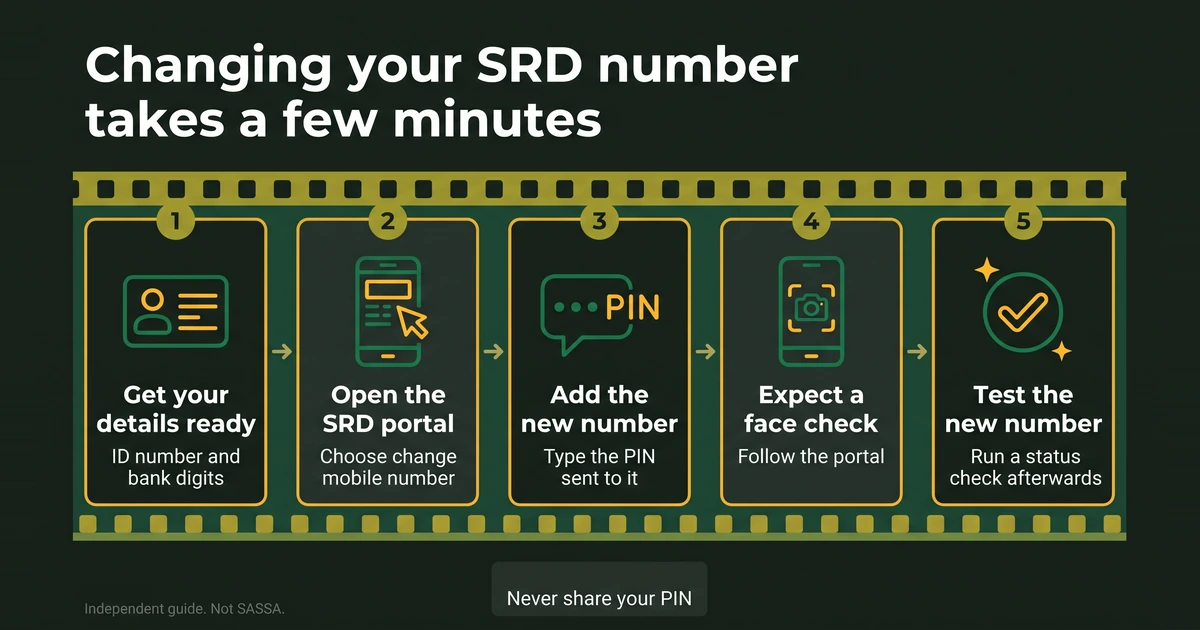
A SASSA change phone number request for the SRD grant is made on the SRD portal, and it takes only a few minutes when your details are to hand. This guide covers the normal route, what to do when the old number is gone, and how to check afterwards that the change worked. The steps come from the portal screens we captured in June 2026 and from SASSA’s 2026 booklet, “You and Your Grant”. Your screens may look slightly different.
What you need before you start
Gather these first, so you do not get stuck halfway and time out:
- Your 13-digit ID number, the same one you used on your application.
- The reason for the change. The portal gives you a list of reasons, for example “New phone”. Pick the one that matches what really happened.
- Your current payment option: own bank account, post bank account or cash send. The form asks for the one you have now, so if you have changed it since you applied, use the latest.
- The last four digits of your bank account. Look for the account number in your banking app, on a statement or on a bank confirmation letter. The long number printed on a bank card is a card number, and that is not the same thing.
- The new number, with the SIM working. The 6-digit PIN is sent to the number you type in, so the SIM must be in a phone with signal.
- A phone with a working camera and some data, in case the portal asks for a face check.
How to change your SRD phone number on the portal
How to change your SRD phone number
Got a new SIM or a new phone? You can change your SRD phone number on the official portal. You will need your ID number, the reason for the change, your current payment option and the last four digits of your bank account.
-
Find the mobile number box
On the SRD home page, scroll to “How can I change my Mobile details” and press “click here to change your Mobile Number”.

-
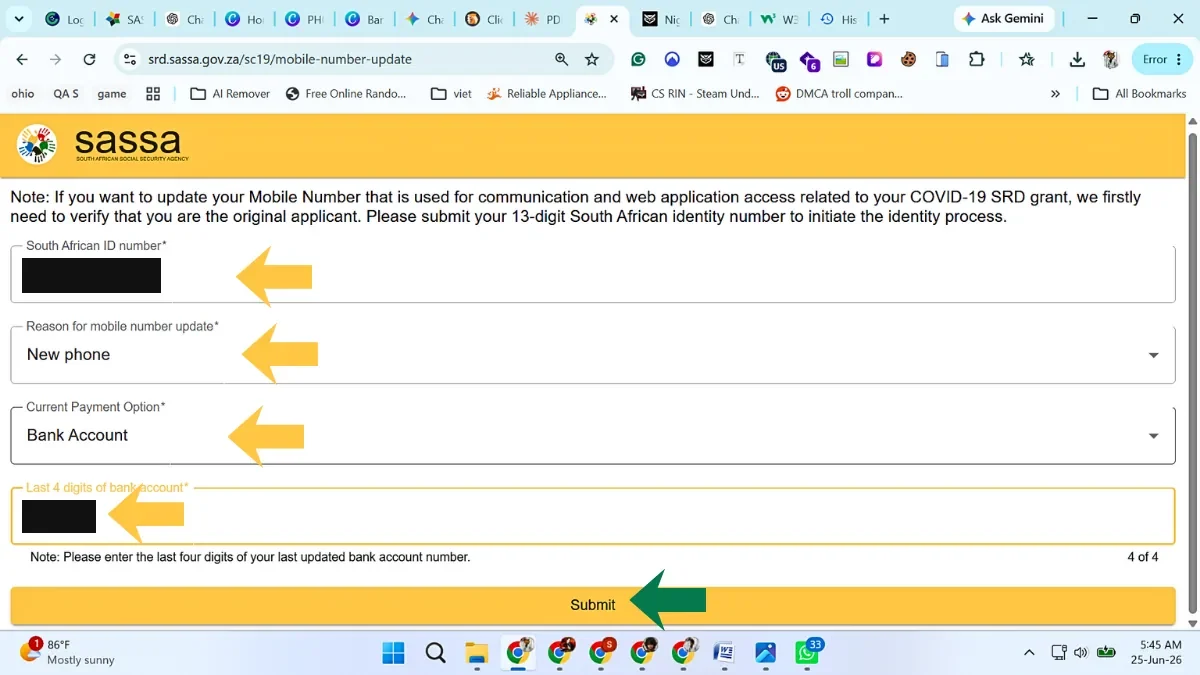
Verify your details
Type your 13-digit ID number, choose the reason for the update (for example, New phone), pick your current payment option and enter the last four digits of your bank account. Press Submit.
-
Enter the new cell number
Type the new cellphone number and press “Send PIN”. A 6-digit PIN goes to the new number.

-
Type the PIN and submit
Enter the 6-digit PIN you received on the new number and press Submit.

-
Find the mobile number box
On the SRD home page, scroll to “How can I change my Mobile details” and tap “click here to change your Mobile Number”.

-
Verify your details
Type your 13-digit ID number, choose the reason for the update, pick your current payment option and enter the last four digits of your bank account. Tap Submit.

-
Enter the new cell number
Type the new cellphone number and tap “Send PIN”. A 6-digit PIN goes to the new number.

-
Type the PIN and submit
Enter the 6-digit PIN from the SMS and tap Submit.

SASSA’s 2026 booklet says applicants who change their cellphone number must also complete facial recognition verification, so the portal may ask for a face check as well.
The four screens above are the whole route, but a few details are easy to miss.
Choosing the reason
The portal asks you to choose a reason, for example “New phone”, rather than explain yourself. Choose the closest honest option. A reason that does not fit can cause a mismatch later if you are asked to prove it.
The payment option and bank digits
This step is how the portal confirms that you are the applicant. If it rejects your answer, stop and check your details before you try again. SASSA does not publish how many attempts you get, so careful beats fast.
The PIN
The PIN is six digits and arrives by SMS on the new number. Type it exactly as it appears and press Submit. If nothing arrives, do not press “Send PIN” ten times. Follow the ordered fixes in our guide to SASSA OTP not received. Write down whatever message the portal shows after you submit, and take a screenshot. We have no verified description of the final screen, so your own record is the best proof that you did it.
Why the portal may ask for a face check
SASSA’s 2026 booklet says applicants who change their cellphone number must also complete facial recognition verification. The booklet does not describe the screens, and the SRD home page lists e-KYC as one of its options, so the face check is done through the official portal. Follow whatever the portal shows you on the day.
A face check goes better with good light on your face, no hat or sunglasses, a steady hand and a data connection that will not drop. If it fails, read our guide to SRD identity verification failed.
Do not skip the check, because the booklet says you must complete it. SASSA has not published how long you have, so do it as soon as the portal asks.
If you have no smartphone, no data or a broken camera, SASSA Mpumalanga said on 27 January 2026 that its offices can help with the biometric check, using kiosks, an official laptop or guest Wi-Fi. That statement came from one province, so phone the call centre first and ask what your nearest office offers.
Which route fits your situation?
| Your situation | What to do |
|---|---|
| New handset, same SIM and same number | Nothing. Your number has not changed, so there is nothing to update. |
| New SIM and new number, and you can still receive SMS on it | Use the portal route above. |
| SIM lost, stolen or damaged, but the number is still yours | Ask your network provider for a SIM swap. You get the old number back, and SASSA’s records stay correct. |
| Old number gone for good | Try the portal route with the new number. If it fails, go to a SASSA office or call the call centre. |
| You cannot remember the payment option or the bank digits | Check your banking app or statement first. If you still cannot tell, go to a SASSA office with your original ID. |
| No smartphone or data | Ask a SASSA office for help with the digital steps. |
How to change your SRD phone number without the old number
On the screens we captured, the PIN is sent to the new number you type in, not to the old one. So losing the old SIM does not automatically block the form. People do report that the portal route can fail when the old number is gone, and SASSA has not published how the system treats someone who cannot receive an OTP on the old number. Work through these in order:
- Try the portal first with the new number, following the steps above. It costs you only a few minutes.
- If the number is still yours but the SIM is gone, get a SIM swap. Go to your network provider’s own shop or official line with your ID. Requirements differ by network, so ask what they need before you travel. Only you should ask for a swap, and never let a stranger organise one on your behalf.
- Go to a SASSA office if the portal refuses you or no PIN arrives. Take your original ID, the new phone with the SIM inside, and any bank letter you have. Ask the official to update the number, and ask whether the face check can be done there. Find your nearest office through the directory on sassa.gov.za.
- Phone the call centre on 0800 60 10 11 for guidance before you travel. It is toll-free and runs on weekday working hours, so confirm the times on sassa.gov.za. Note the date, the time and the agent’s name.
If you have also lost your application ID, you do not need it for this route. Our guide on changing your SRD phone number without an application ID covers that case in detail.
How to test the new number
- Wait a few minutes after the portal accepts the change.
- Run a status check on srd.sassa.gov.za/sc19/status, typed yourself, using your ID number and the new cellphone number. A result on the screen is a good sign.
- If the portal cannot find you, check what you typed, then try again later in the day. SASSA has not published how long an update takes to reach the status page, so do not repeat the whole change straight away. Several changes in a row only add confusion.
- Keep the old SIM, if you still have it, until the new number has worked on the portal at least once.
The real test comes the next time the portal needs a PIN, for example for a banking change. If that PIN reaches the new number, you are done. If it does not, go back to the fixes above.
What not to do
- Do not use a “helper” who charges a fee to change your number. SAnews, on 28 April 2025, urged people not to seek help from strangers with verification, and the same advice applies here.
- Do not tap links in SMS or WhatsApp messages that say your number must be updated “now”. Type the portal address yourself. SAnews has named fake SRD application sites, so check our official links and scam warning if a link looks odd.
- Do not send photos of your ID or selfies to anyone. The only place a face check belongs is the official portal.
- Do not change the number again and again. One careful attempt is better than five rushed ones.
Common problems and quick fixes
“Send PIN” does nothing or the PIN does not arrive. Check signal, wait a few minutes and re-check the number you typed. The full list is in our OTP guide.
The portal says your details do not match. Check the ID number digit by digit, and check that the payment option and bank digits are the ones SASSA holds now. If you changed your bank account recently, our guide to changing your SASSA banking details explains how the two updates fit together.
The status page shows an unfamiliar result after the change. Decode it in our SRD status meanings guide before you decide you need to do anything else.