
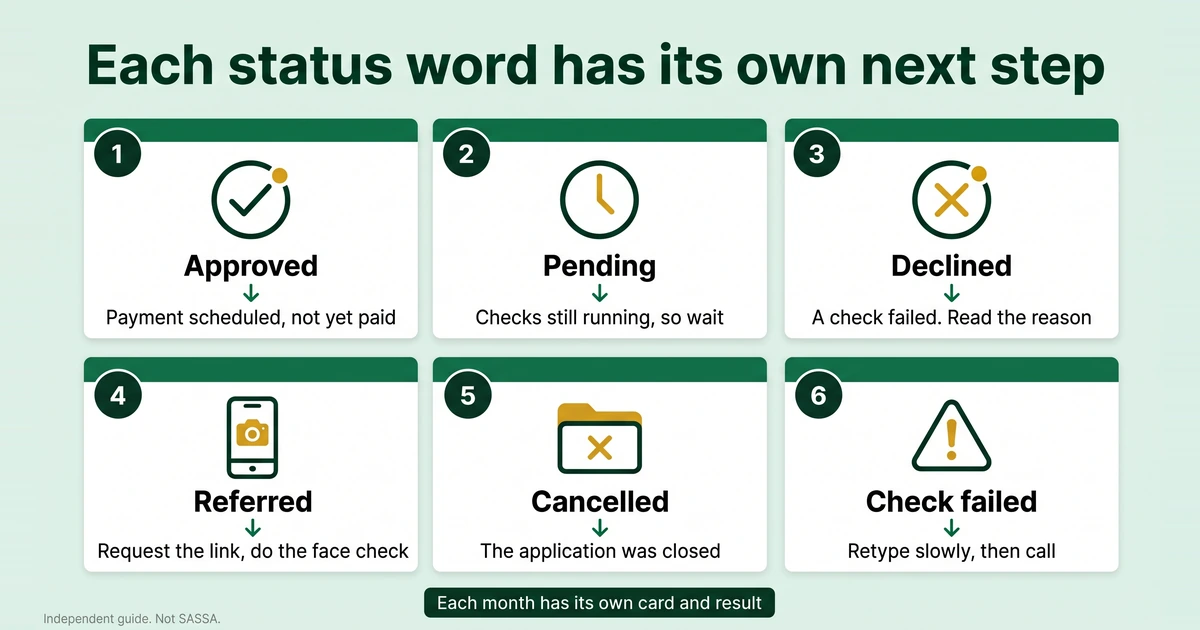
Every SRD result is a single word on a card, and each word points to a different next step. Pick yours in the decoder for a quick answer, or read the section that matches it.
Pick the word you see on the portal.
The decoder runs in your browser. It does not ask for, save or send any personal details.
Every status at a glance
| Status | In plain words | What to do | What not to do |
|---|---|---|---|
| Approved | You passed that month’s checks and a payment is scheduled. | Note your pay day and check your bank details. | Do not assume the money has already arrived. |
| Pending | The checks for that month are still running. | Wait, then check again. | Do not submit a second application. |
| Declined | A check failed for that month. | Read the reason and appeal if it is wrong. | Do not reapply as a way round the decline. |
| Referred | An extra step or a review is needed first. | Log in, request the link and do the face check. | Do not ignore the link or pass it on. |
| Bank details pending or verification failed | SASSA has no usable account, or the bank could not confirm it. | Fix the account, in your own name. | Do not use someone else’s account. |
| Identity verification failed | Your details do not match Home Affairs records. | Recheck what you typed and complete the verification. | Do not ask a stranger to fix it. |
| Failed, no record found or cancelled | The portal cannot find an active application. | Retype carefully, then call if it still fails. | Do not reapply before SASSA confirms. |
Two more results have their own sections further down: cancelled and alternative income identified. The wording on the portal can vary, and your screens may look slightly different.
Approved
Approved means SASSA’s checks for that month came out in your favour and a payment is scheduled. It is a decision, not a deposit. An approved card shows your pay day for that month, and that day is your own: SRD is paid in a window, and SASSA publishes no fixed SRD calendar.
Usual cause. You met the SRD criteria when SASSA ran its checks. SRD is reassessed every month, so an approval is never permanent.
What to do next.
- Note the pay day on your card.
- Make sure the bank account you gave is open and in your own name.
- After the pay day, look for the deposit on your bank statement. Our guide to checking your SRD balance shows how.
- If the card says approved but the money never comes, SASSA’s booklet says you must request a verification link and complete the facial recognition process. See SRD approved but no payment.
What not to do. Do not treat the word as proof of payment. Do not let anyone “collect” for you with your card and PIN. Do not leave an approved month sitting: the booklet lists “not claimed within 90 days of approval” as a reason a grant can lapse, but it is written for social grants, so confirm with SASSA how it applies to SRD months.
Pending
Pending means SASSA’s checks for that month are still running and no decision has been made. It is not a rejection.
Usual cause. SASSA compares your details with other data. SASSA Mpumalanga said on 27 January 2026 that the system checks external databases, including banks. How long does SASSA pending take? SASSA publishes no official time. As practical advice only, give it about a week before you check again.
What to do next.
- Keep the phone you applied with switched on, so an SMS from SASSA can reach you.
- Check again after a few days, using the address you type yourself.
- If the card changes to referred, act on that straight away.
- If it stays pending for weeks, phone the call centre on 0800 60 10 11 and ask.
What not to do. Do not reapply: our reapplication guide explains when a new application is actually needed. Do not change your phone number or banking details without a real need, because a changed number brings a face check of its own. Do not pay anyone to “release” a pending month.
Declined
Declined means you failed at least one check for that month. The result belongs to that month’s card only, so a later month can come out differently. SASSA Mpumalanga said on 27 January 2026 that a declined applicant has the right to appeal.
Usual causes. Each reason lines up with one of the SRD criteria. A card may be declined because:
- SASSA found another source of income (see alternative income identified below).
- You are outside the age range of 18 to 59, or you receive another social grant for yourself.
- Your details do not match the Home Affairs database.
- You appear to be maintained or cared for in a state-funded institution.
- You did not pass the means test SASSA applies. The 2026 booklet states no income figure, so confirm the current limit with SASSA instead of trusting a number from a post. See the eligibility and means test guide.
What to do next.
- Read the reason shown with the declined month.
- Match it to your real situation. If it is correct, an appeal will not help.
- If it is wrong, appeal. Each declined month needs its own appeal, and the portal allows one appeal per declined month.
- Gather proof before you start, and appeal early. Third-party sites quote 90 days. SASSA’s own pages do not state it in this form, so confirm with SASSA.
The SRD appeal guide has the portal steps. How long an appeal takes and reconsideration have their own pages.
What not to do. Do not reapply to get round a decline: the route for disputing a month is an appeal. Do not hand your details to a “helper” who promises to reverse it.
Referred
Referred means SASSA needs an extra step or a review before it decides. SASSA’s 2026 booklet says people with a referred status must log in to the SRD portal, request a link to update their information and complete the facial biometric check.
Usual cause. A flag or a mismatch that SASSA wants to verify. New applicants must also complete the face check before approval, and so must applicants who change their cellphone number.
What to do next.
- Open the portal by typing the address yourself.
- Log in and request the link to update your information.
- Complete the face check on a phone with a working camera, in good light.
- Check your status again afterwards.
SAnews reported on 28 April 2025 that people flagged for identity verification receive an SMS link that must be attended to within 72 hours, so do not sit on it. Without a smartphone or data, ask your local office for help: SASSA Mpumalanga said its offices can assist with the face check.
What not to do. Do not ignore the link. Do not seek help from strangers, which SAnews also urged. Do not reapply, because the application is still alive.
Bank details pending or verification failed
These two messages share a fix. Bank details pending means SASSA has no usable account for you. Verification failed means the bank could not confirm the account you gave.
Usual cause. A mistyped account number, a closed account, or a name on the account that does not match your ID. SASSA cannot pay into another person’s bank account, so an account in someone else’s name will fail.
What to do next.
- Open the banking details page on the SRD portal. It sends a 6-digit PIN by SMS to your registered number.
- Enter an account in your own name, with your names and surname as on your ID.
- Check the bank, branch, account type and account number digit by digit before you submit.
- Wait for the result before you change anything again.
The full steps are in how to change your SASSA banking details, and SRD bank verification failed covers the causes in more depth.
What not to do. Do not use a relative’s or friend’s account. Do not give your card, PIN or banking password to anyone who offers to “fix the account”. Change the details once, correctly, rather than several times in a row.
Identity verification failed
This result means the details you gave do not match Home Affairs records. SASSA compares your ID number and name with that database, and a mismatch stops the process.
Usual cause. A typing error in the ID number, a different spelling of your name, or a flag raised by SASSA’s own checks.
What to do next.
- Compare what you typed with your ID document, letter by letter. Copy the spelling from the document, not from memory.
- Request the verification link on the portal and complete the face check.
- If it still fails, take your original ID to a SASSA office.
See SRD identity verification failed for more.
What not to do. Do not ask a stranger or a “helper” to sort it out. Do not submit new applications with guessed spellings of your name. Do not share the link or any OTP.
Failed, no record found or cancelled
This result means the portal cannot find an active application for the details you typed.
Usual cause. A mistyped ID or phone number, a phone number that is not the one on the application, an application that was never completed, or an application that was cancelled. The booklet says the date of application is the day a complete online application is successfully submitted, so a half-finished form leaves nothing on file.
What to do next.
- Retype your ID and phone number slowly, and use the number from your application.
- Try again later, in case the portal was busy.
- If it still fails, call 0800 60 10 11 or visit an office with your original ID.
- Reapply only if SASSA confirms that no application is on file.
Our guide to a failed SASSA status check lists every cause in the order to test it.
What not to do. Do not reapply straight away. Do not keep guessing at numbers. Do not try look-alike websites that promise to “recover” your application.
Cancelled
Cancelled means the application was closed. The SRD home page lists a cancel application option, so you can close one yourself, for example after applying twice by mistake. We have not found every reason an application can be closed in SASSA’s published material.
Usual cause. You cancelled it, or someone using your details did. If you did not cancel it and cannot explain it, treat that as a warning sign.
What to do next.
- Confirm the result with a fresh status check, using the ID and phone number from your application.
- Call 0800 60 10 11 and ask SASSA what happened to the application.
- If you think someone used your ID, report it on the anti-fraud line, 0800 701 701.
- Reapply, online, only after SASSA confirms the application is gone.
Cancelling an SRD application covers the cancel option, and the SRD application guide covers applying again.
What not to do. Do not cancel a pending or declined application to “reset” it, because we know of nothing from SASSA to say that helps. Do not reapply before you have confirmed the facts.
Alternative income identified
SASSA Mpumalanga said on 27 January 2026 that the system can decline an applicant when it finds another source of income, and that it checks external databases, including banks.
Usual cause. Money that SASSA’s checks count as income: deposits into your bank account, or records held by another agency. The portal may show labels such as UIF or NSFAS, and these are often shown with this reason. The real labels on the portal can differ.
What to do next.
- Open your recent bank statements and look at every deposit.
- Separate regular income from one-off money that is not income, such as a refund or a payment you passed on to someone else.
- If the record is wrong, appeal. Attach the statements and add a short, factual reason.
- If the income is real and ongoing, accept that month’s result. SRD is reassessed monthly, so a later month can differ.
What not to do. Do not send edited statements or invented explanations. The application declaration says false information can lead to rejection or to money being recovered. Do not pay anyone to “clear” the record.
What the month label means
On a computer or a phone, your result appears as one card per month, labelled like “MAY2026 APPROVED”. The first part is the month and year, and the last word is the status for that month. The newest month sits at the top, and older months follow as you scroll.
Three things follow from that layout:
- Every card is its own decision. An approved May says nothing about June, and a declined May does not stop June being approved.
- Approved cards carry a pay day. The portal writes it in the same month-and-year style, for example “your payday is 15, JUN2026”, and the phone layout showed “payment date: Day 28 of JUN2026”. We have not seen SASSA explain how the card’s month and the pay day’s month relate, so rely on the date in the pay day line itself.
- The label picks the month in an appeal. The appeal page asks you to choose the declined month from a list, so you need to know which card was declined before you start.