
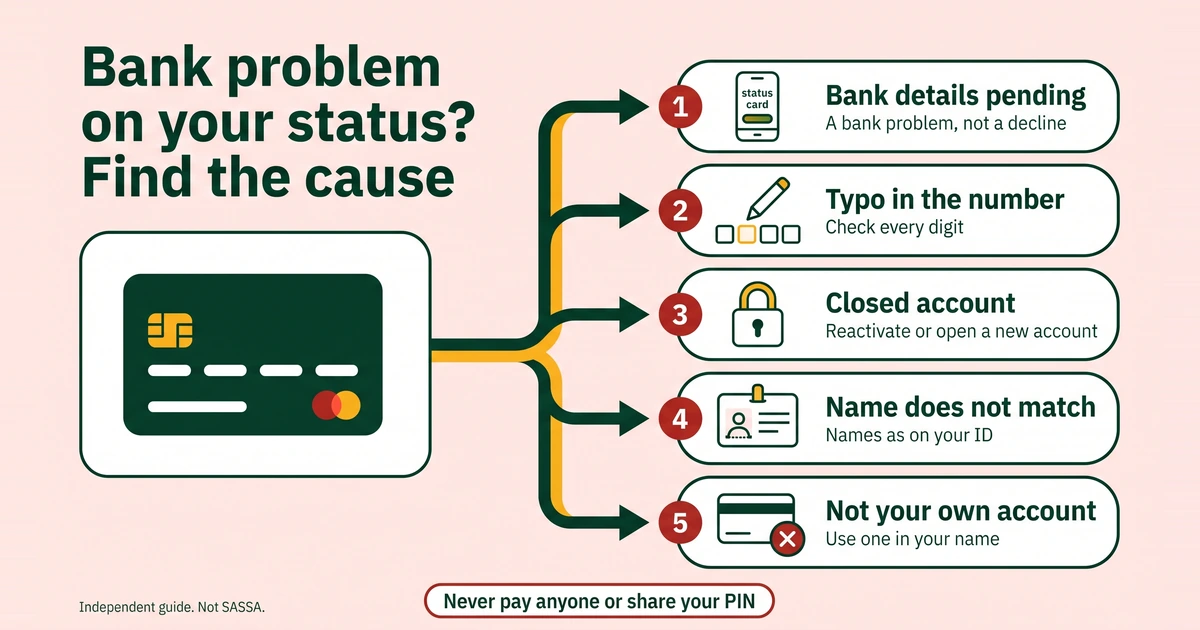
People who search for “sassa status check banking details” are usually looking at a status card that mentions the bank, with a payment they cannot get. The wording differs from person to person: “bank details pending”, “bank verification failed” or something similar. All of them point the same way. SASSA either has no account it can use for you, or the bank could not confirm the account it has. This page explains the usual causes, helps you find yours and walks you through the fix.
What do “bank details pending” and “bank verification failed” mean?
Both describe a problem on the payment side. They do not describe whether you meet the SRD criteria. There are two common situations behind the words:
- Nothing usable is on file. The details were never given, were saved incompletely, or belong to an account that no longer works.
- Details were given but could not be confirmed. The account number, the account type or the names did not line up with what the bank holds.
SASSA does not publish a list of the exact words the portal can show, and your screen may look slightly different from what other people describe. If your word is not in this guide, pick the closest one in the status decoder, or read the matching section of SRD status meanings explained.
SRD is reassessed every month, so a bank message can appear on one month’s card and not the next. Look at each month separately on the status page.
What are the usual causes?
SASSA does not publish a list of causes. The ones below are the usual suspects, because the banking form compares exactly these items. Use the table to match what you see with what to check.
| Likely cause | What it looks like | How to check | The fix |
|---|---|---|---|
| A typo in the account number | One digit swapped, missing or added | Compare each digit with your bank’s own record | Resubmit the correct number once |
| A closed or dormant account | The bank has shut the account, or it is inactive and may not accept deposits | Ask your bank whether it is open and can receive money | Reactivate it with the bank, or open an account in your own name and update SASSA |
| A name mismatch | Nickname, swapped names, a missing name, or an old surname on the account | Compare the account’s name with your ID, letter by letter | Resubmit the names as printed on your ID, or ask the bank to correct its record |
| An account not in your own name | The account belongs to a partner, parent, friend or “helper” | Look at the name holder on your bank record | Use an account in your own name |
| The wrong account type | The type you chose does not match how the bank describes the account | Check the type on your bank paperwork | Resubmit with the matching type |
SASSA’s banking page states that it cannot pay into another person’s bank account. If your account is shared, we do not know how SASSA treats it, so the safest choice is an account in your name alone.
Is it really a bank problem?
Four other situations look similar on a busy day, and each has a different fix:
- Approved but not paid. The booklet says you must request a verification link and complete facial recognition. That is a face check, not an account error. See approved but no payment.
- Referred. The booklet says you must log in to the SRD portal, request a link to update your information and complete the facial biometric check.
- Your pay window has not opened. SASSA publishes no fixed SRD pay date. Your own pay day shows on your status card, and any window quoted elsewhere is an estimate. See SRD payment dates.
- Declined. That is an eligibility result, and the route for it is an appeal, not a bank change. See the SRD appeal guide.
If your card names the bank, or says bank details pending or bank verification failed, you are in the right place. If it does not, check the word on your card first.
How do you fix it, step by step?
- Write down what you see. Note the exact words on the card and the month. Take a screenshot. You will want it if you need to phone SASSA.
- Get the facts from your bank. Ask for confirmation that the account is open, is in your name and can receive deposits. Ask for the account number, the account type and the branch as the bank records them. A bank letter or recent statement is the best proof.
- Compare, do not guess. Put your bank’s facts next to your ID. Check the account number digit by digit, and check the names letter by letter. If you cannot remember what you typed before, assume it needs redoing.
- Open the update page yourself. Type the address into your browser, then scroll to “How can I change my Banking details”. Our page on the SASSA banking details link shows how to avoid fake pages. The field-by-field flow is in our guide to changing your banking details.
- Submit once. If the PIN does not arrive, see OTP and PIN problems. If the registered number is no longer yours, change your SRD phone number first.
- Check your status again later, not repeatedly. Use the normal status page. If it now shows a face check or a verification link, do it on the official portal only.
The booklet says that if a status shows approved but not paid, you must request a verification link and complete facial recognition. That is a separate problem from a bank error, though the two can overlap. Read approved but no payment if your card says approved and the money has not arrived.
How long should you wait before trying again?
SASSA publishes no official time for a bank problem to clear, so we cannot give you one. This is practical advice, not an official rule: after one correct submission, give it about a week before you decide it has failed, and check no more than once a day. If you know you made a typo, correct it straight away, once. Do not keep resubmitting the same details. It will not speed anything up, and it makes your record harder to read.
The monthly reassessment gives you a natural checkpoint. When the next month’s card appears, look at whether the bank wording is still there.
When should you call 0800 60 10 11?
Call the toll-free SASSA call centre on 0800 60 10 11 if:
- The status still shows a bank problem after you have corrected the details and waited.
- Your account is open, in your name and the details match, but the problem remains.
- The PIN never arrives and you still have the registered phone.
- You think someone else changed your details.
SASSA’s call centre works weekday working hours, so confirm on sassa.gov.za. Have your ID number ready, along with your application ID, the screenshot and your bank letter. You can also email [email protected] with the application ID and a screenshot. Never put a PIN, OTP or card number in an email. To report suspected fraud, use the anti-fraud line, 0800 701 701. Our SASSA contact numbers page lists every verified channel.
What is the safe alternative if the account will not work?
Open an account in your own name. Ask the bank what documents it needs, and take your original ID. We make no claim about which bank is quickest, because SASSA publishes no comparison and the process differs by bank. Do not pay a middleman, and do not hand your ID and PIN to a “helper” to open it for you. Once the new account is open, update your details with the steps above. Our guide to the SASSA Gold Card and Postbank covers card-based payments.