

Searching for “how to apply for sassa unemployment grant”? The grant you want is the Social Relief of Distress grant, usually shortened to SRD. People call it the unemployment grant because it supports adults who have little or no income, and many still call it “R350” after the first amount. It now pays R370 a month, and it is funded to 31 March 2027. The Department of Social Development said on 15 January 2026 that claims the grant is about to end are false. This guide takes you from “Do I qualify?” to “I have submitted, what now?”.
Who can apply for the SRD grant?
SASSA’s 2026 booklet sets out the criteria. We have grouped them so that you can see where you stand:
| Group | What the booklet says |
|---|---|
| Status | A South African citizen, a permanent resident, a recognised refugee, or the holder of a valid special permit (Angolan, Lesotho or Zimbabwe exemption), or an asylum seeker with a valid Section 22 permit or visa. You must also be registered on the Home Affairs database. |
| Age and place | You are 18 to 59, you live inside South Africa and you are not maintained or cared for in a state-funded institution. |
| Money and support | You pass the means test and you do not receive another social grant for yourself. |
| Work and education | You do not unreasonably refuse work or education. |
The means test looks at income, and at your spouse’s income if you are married. Most sources quote a limit of R624 a month. SASSA’s 2026 booklet does not state a figure, so confirm it before you rely on it. SASSA checks your income against other data every month, so a result can change from one month to the next. Our guide to the SRD means test and eligibility goes deeper.
Try the checker below. It runs in your browser and does not store or send what you pick.
Eligibility self-check
Runs in your browser8 quick questions that follow the criteria in SASSA’s 2026 booklet. It never asks for your ID number, nothing is saved, and only SASSA decides.
If you are 60 or older, SRD is not for you, but the older persons grant may be. If you care for a child, look at the child support grant.
What to have ready
- Your ID number and your ID document, so that you can copy your names exactly as they are printed.
- A cellphone that is yours, with a working SIM and signal. A 6-digit PIN is sent to it by SMS, and you need to be able to keep this number.
- Data or Wi-Fi, and a phone or computer with a working camera for the face check.
- Your province, district, municipality and ward. The form asks for all four. If you do not know your ward, find out before you start, for example from a municipal account or your municipality’s office.
- A payment option you can really use. An account in your own name, if you choose the own bank account option. Check the account number digit by digit.
- A quiet spot and a pen. You will want to write down your application ID.
Where to apply: online only
SASSA’s booklet says SRD is accessed only through online application channels, so there is no paper form to collect, download or fill in at a counter. The application is on the official SRD portal, srd.sassa.gov.za. Type that address into your browser yourself.
How to apply for the SRD grant, step by step
How to apply for the SRD grant online
To apply for the SRD grant online, use the application page on the official portal. Have your ID number, a phone that can receive an SMS, and your personal details ready. The screens below show every step in order, on a computer and on a phone.
-
Open the portal and choose to apply
On the SRD home page, find the box “How do I apply for this SRD Grant” and press “click here to apply online”.

-
Enter your cellphone number
Type your 10-digit cellphone number and press “Send SMS”. Use a number that is yours, because the PIN goes there.

-
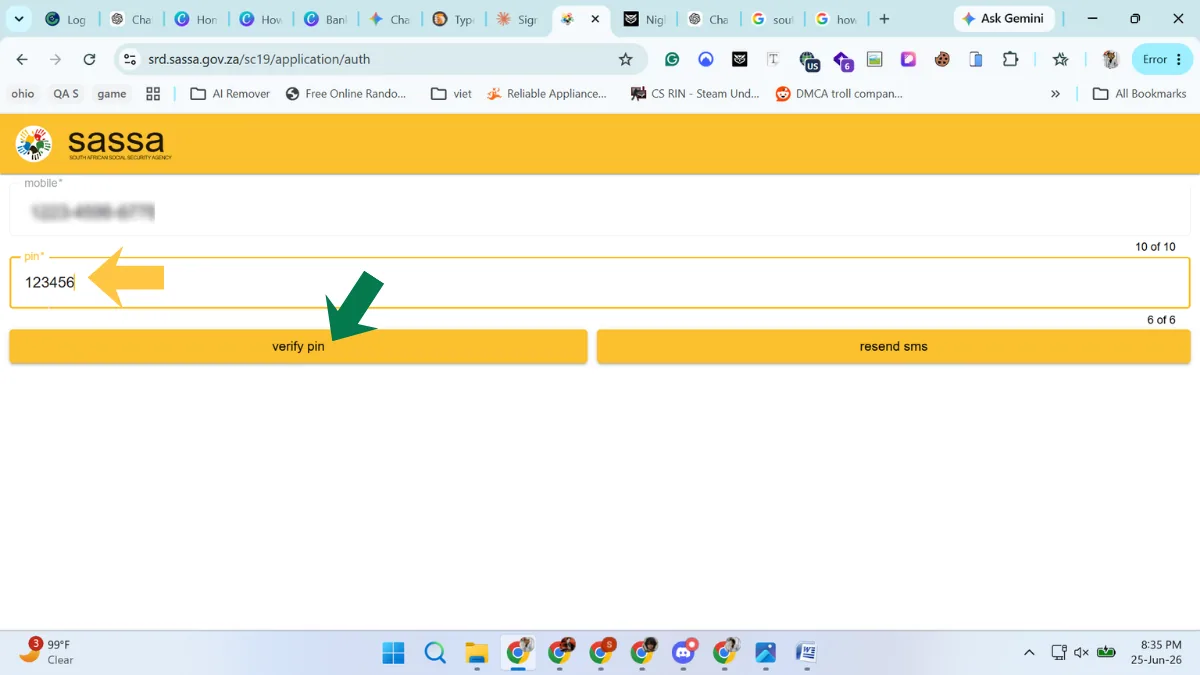
Type the PIN you receive
A 6-digit PIN arrives by SMS. Type it into the PIN box and press “verify pin”. If nothing arrives, press “resend sms”.
-
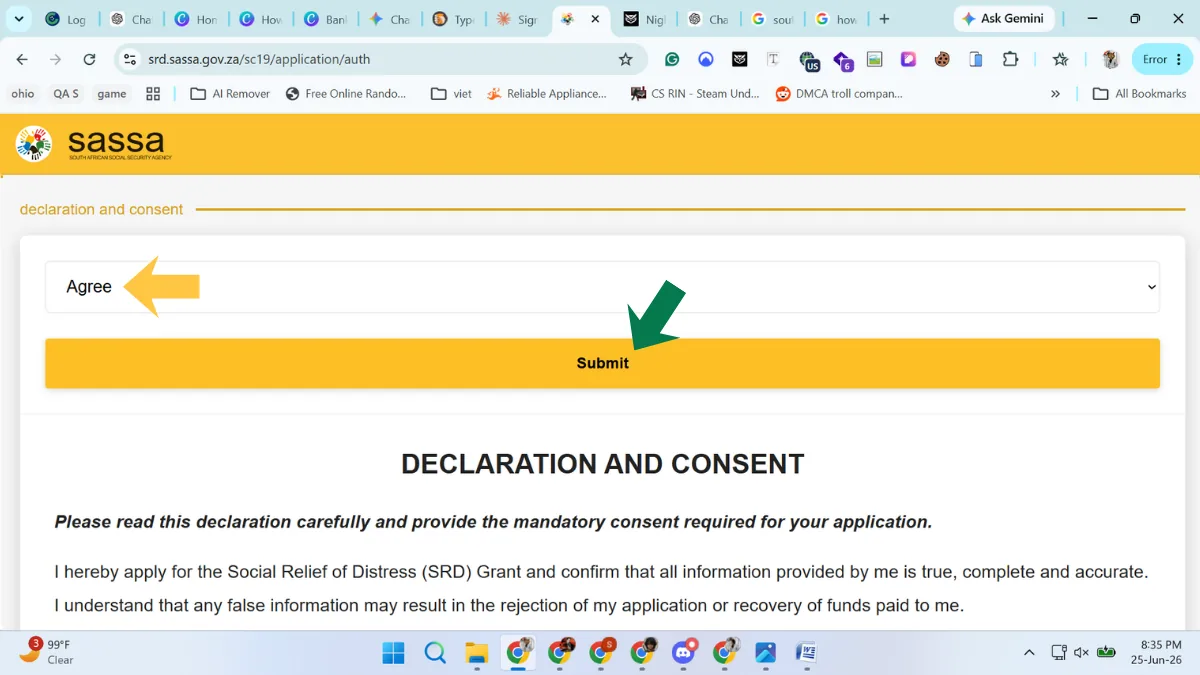
Agree to the declaration
Choose “Agree” in the drop-down and press Submit. The declaration says the information you give is true, and that false information can lead to rejection or to money being recovered.
-
Enter your ID details and verify
Type your ID number, full name and surname exactly as they appear on your ID, then press “Verify Identity”. SASSA matches them against Home Affairs records.

-
Fill in your personal details
Complete the form: email address, gender, highest education, when you were last employed, disability and citizenship. Be honest, because false information is punishable by law.

-
Choose how you want to be paid, then submit
Your application ID appears at the top. Write it down. Then choose a payment option (post bank account, your own bank account, or cash send) and press Submit.

-
Open the portal and choose to apply
On the SRD home page, scroll to “How do I apply for this SRD Grant” and tap “click here to apply online”.
-
Start with your ID number
Type your South African ID number and tap “Send SMS”. The page explains that a PIN will be sent to the mobile number registered for you.

-
Type the PIN
Enter the PIN from the SMS and tap “verify pin”. Tap “resend sms” if nothing arrives.

-
Agree to the declaration
Choose “Agree” and tap Submit. Read the declaration first: it says false information can lead to rejection or recovery of money paid to you.

-
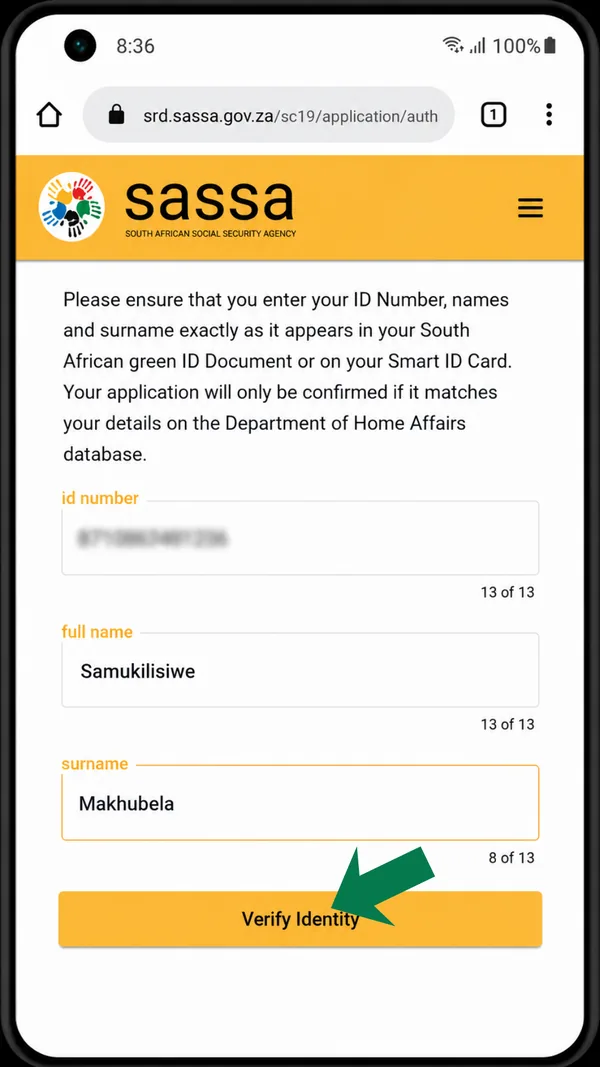
Verify your identity
Enter your ID number, full name and surname exactly as on your ID, then tap “Verify Identity”.
-
Fill in your personal details
Add your email, gender, highest education, when you were last employed, disability and citizenship.

-
Add your location and submit
Choose your province, district, municipality and ward number, check the cell phone number for notifications, then tap “Submit Application”.

The computer and phone screenshots were captured on different days, so the form fields are not identical. Follow the screens you see on the portal.
The screenshots show each screen in order. Here is what they cannot tell you.
The PIN steps
On the computer screens we captured, the application began with your cellphone number. On the phone screens it began with your ID number. Either way, a 6-digit PIN is sent by SMS, you type it in and you press “verify pin”. If it does not arrive, press “resend sms” once and wait. Our guide to what to do when the SASSA OTP does not arrive gives the full order of fixes. Never share the PIN with anyone.
The declaration
You choose “Agree” and submit. Read the declaration first. It says that the information you give is true and that false information can lead to rejection or to money being recovered.
The identity step
Type your ID number, your full names and your surname exactly as they appear on your ID, then press “Verify Identity”. SASSA compares what you typed with Home Affairs records. Copy the spelling from your ID document, not from memory, a bank card or an old form. If this step fails, read what to do when SRD identity verification fails.
Personal details and location
You are asked for your email address, gender, highest education, when you were last employed, disability and citizenship, and then your province, district, municipality and ward. Answer honestly, because false information is punishable by law. On the phone screens, the last page asks you to check the cellphone number for notifications, so make sure it is a number you can receive SMS on.
The last page
The computer flow shows your application ID at the top of the final page. Write it down and take a screenshot as well. On the final screen you choose a payment option and submit.
Choosing a payment option
| Option | What to check |
|---|---|
| Own bank account | The account must be in your own name. SASSA’s page states it cannot pay into another person’s bank account. Check that the account is open, and type the account number digit by digit. |
| Post bank account | The portal lists it as an option. Our guide to the SASSA Gold Card and Postbank explains the post bank route. |
| Cash send | The portal lists it, but SASSA’s pages that we reviewed do not explain how collection works. Read the portal’s description and phone the call centre before you choose it. |
We do not publish bank fees or bank-by-bank rules. Ask your bank about fees and check your statement to see when money arrives. If your account changes later, the SRD portal has a banking details option, which our guide to changing your SASSA banking details walks through.
The face check for new applicants
SASSA’s booklet says new applicants must complete the facial biometric check, called eKYC, before approval. The SRD home page lists e-KYC as an option. Plan for it from the start: good light on your face, no hat or sunglasses, and a data connection that will not drop.
On 28 April 2025, SAnews reported that people flagged for identity verification receive an SMS link that must be attended to within 72 hours, and it urged people not to seek help from strangers. If you have no smartphone, laptop or data, SASSA Mpumalanga said on 27 January 2026 that its offices can help with the biometric check, using kiosks, an official laptop or guest Wi-Fi. That statement came from one province, so phone the call centre first and ask what your office offers.
After you submit: how to track your result
The booklet says the date of application is the day a complete online application is successfully submitted, so an unfinished form does not count. Then:
- Save your application ID and keep your screenshot.
- Check your status on the official portal with your ID number and the cellphone number you applied with. Our status decoder on the homepage explains each result, and our guide to the ways of checking your SRD status lists every option.
- Read the result month by month. SRD is reassessed every month, so each month has its own card, and a result can change.
- Do not reapply if it says pending. SASSA publishes no official time for pending. As practical advice, check again after about a week. A second application only adds confusion.
- Look for your pay day on the status card. SASSA does not publish a fixed SRD calendar. Our SRD payment window guide labels every window as estimated or not published.
Seeing “confirm existing application”?
Some readers report a prompt that asks them to confirm an existing application. We have not verified that screen or SASSA’s wording. The safe rule is simple: if an application already exists for your ID, do not create a second one. Check your status, and read our guide to how to reconfirm your SRD grant.
Common application mistakes
- Typing one wrong digit or a misspelt name. The identity check compares your details with Home Affairs, so even a small difference can cause a failure.
- Applying with a number you cannot keep. A borrowed or old number sends your PIN, and later your messages, to the wrong person. Changing a number afterwards triggers a face check, as our guide to changing your SRD phone number explains.
- Choosing an account that is not yours or not open. This is a common cause of bank problems later.
- Leaving the form unfinished. The date of application counts only when the application is complete.
- Applying a second time instead of checking the first. Check your status before you do anything else.
- Skipping the face check. The booklet says new applicants must complete it before approval.
- Mixing up the portals. services.sassa.gov.za is for the other grants, not for SRD.
What happens next
| What your status shows | What to do |
|---|---|
| Approved | Check your bank details and watch for your pay day. |
| Pending | Wait. Do not reapply. |
| Declined | Read the reason. SASSA Mpumalanga said the system can decline an applicant when it finds another source of income, and that it checks external databases, including banks. A declined applicant has the right to appeal, and each declined month needs its own appeal. See how to appeal a declined SRD month. |
| Referred | Log in, request the verification link and complete the face check. |
| No record found, or cancelled | Retype your details carefully. If the application is really gone, see how to reapply. |
Our SRD status meanings guide explains each result in more detail.
If SRD is not the right grant
SRD is for adults aged 18 to 59 with little or no income who receive no other grant for themselves. Other grants have their own rules and are applied for at a SASSA office or on services.sassa.gov.za. Our guide to SASSA grants compares them and says which one fits which situation.