
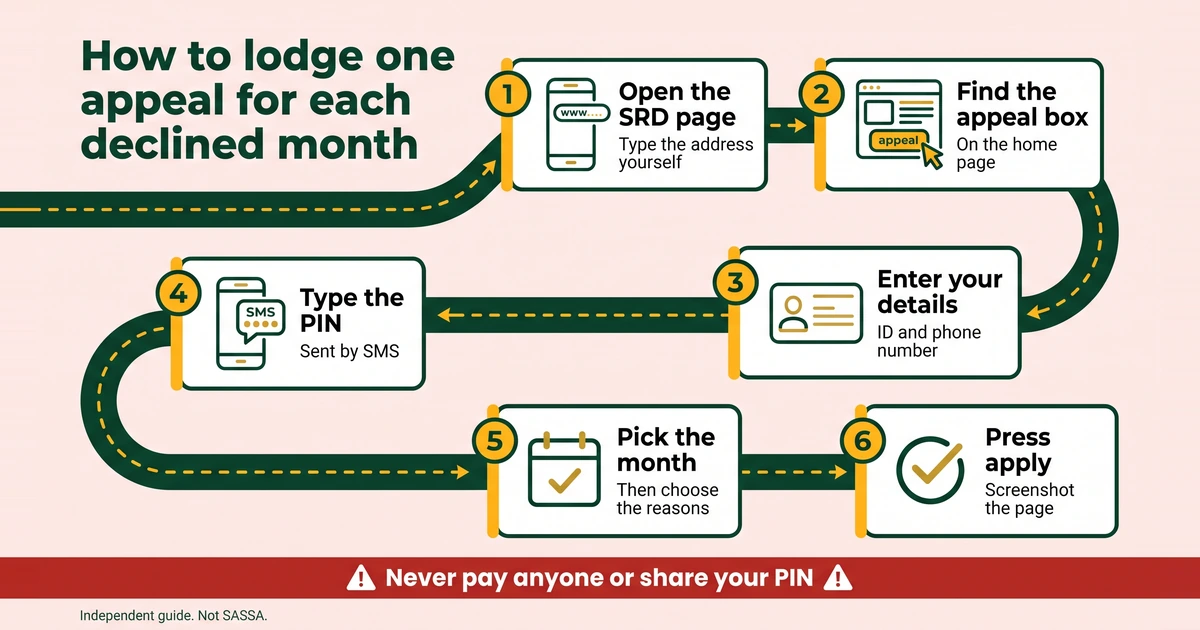
An SRD appeal is how you ask SASSA to look again at a month that was declined. You lodge it on the SRD portal, one appeal for each declined month, and you confirm it with a PIN sent to your registered phone. It is worth doing when you believe the decline is wrong and you can show why. It is not a way around the criteria, and nobody can promise it will succeed. This guide covers when to appeal, which proof helps, how to word your reason, the steps, the deadline question and what comes next.
When can you appeal?
You can appeal a month that shows as declined. The status page lists one card for each month, so look at the month you want to challenge and read the wording on the card before you start. Our guide to SRD status meanings explains what each word means.
Three things are worth knowing:
- You have a right to appeal. SASSA Mpumalanga said on 27 January 2026 that a declined applicant has the right to appeal. The same statement said the system can decline an applicant when it finds another source of income, and that it checks external databases, including banks.
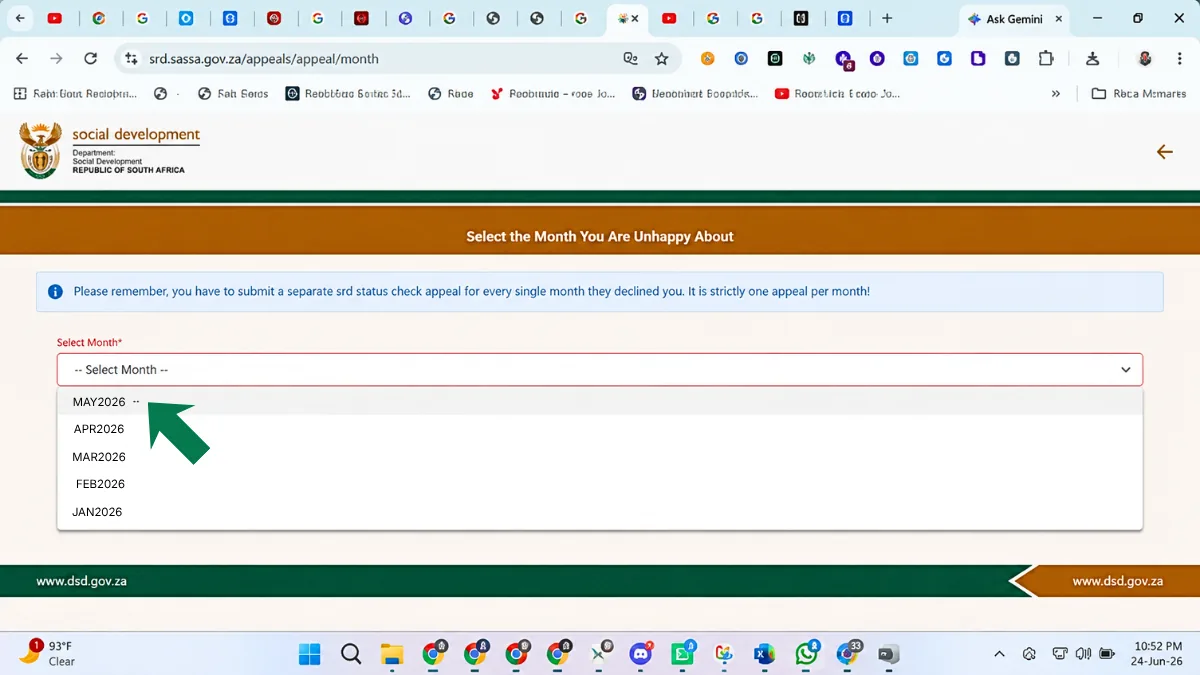
- It is one appeal for each declined month. The appeal page in our June 2026 screenshots says so plainly. If two months were declined, you lodge two appeals.
- You need your registered phone. The PIN is sent to the number on your application.
The reason shown for a decline is often income, UIF or NSFAS, but the labels on the portal can differ from those words. Treat the reason you see as the thing you must answer.
When should you not appeal?
An appeal is the wrong tool in several situations. Check these before you spend time on one:
- You receive another grant for yourself. SASSA’s booklet says an SRD applicant must not receive another social grant for themselves, and SRD is not paid on top of one. An appeal will not change that, so do not expect it to.
- You fall outside the criteria. The criteria include being aged 18 to 59 and living inside South Africa. See who qualifies for SRD for the full list.
- The real problem is your details. A bank problem is not a decline, so fix it on the banking page: bank verification failed. An identity mismatch has its own fix: identity verification failed.
- Your application has expired or been cancelled. That calls for a new application, not an appeal. See SRD reapplication.
- Your reason is not true. The application declaration warns that false information can lead to rejection or to money being recovered. Only appeal on facts you can prove.
What proof helps an appeal?
SASSA has not published a list of accepted documents, so this table is advice, not a rule. Match your proof to the reason the portal shows.
| Reason shown (labels may differ) | Proof that may help |
|---|---|
| Income or bank deposits | Bank statements for the months in question, with each once-off deposit explained in a few words |
| UIF | A letter from UIF about the status of your claim |
| NSFAS or study | A letter from your institution or NSFAS about your funding |
| Name or ID mismatch | A Home Affairs letter, or a clear copy of your ID showing the correct details |
| Another grant | Proof that the grant is not paid to you |
| Employment | A letter from a past employer showing your last working day |
Save clear photos or scans in one folder on your phone, with the month in each file name. Never hand over an original document unless a SASSA office asks for it in person. In our June 2026 screenshots the appeal had no upload step, so you may not be able to attach anything on the portal. Keep the proof ready for SASSA or the call centre.
How do you write a good reason?
In our June 2026 screenshots, the appeal reason is chosen from a drop-down list. Pick the option that matches your real situation, not the one that sounds most likely to win. If you are given a text box, or you write to SASSA by email later, follow these rules:
- One month, one problem. Name the month and the single thing that is wrong.
- One fact at a time. Say what the record says and what is actually true.
- Mention your proof, and say you can provide it.
- Stay short and calm. A few lines beat a long story.
A strong reason reads like this: “I was not employed in the declined month and I do not receive UIF. The deposit on my statement was a once-off payment from a family member, not a salary. My statements for that month are saved and I can provide them.” A weak one reads like this: “Please help me, I am suffering and I need this money.” The second may be true, but it gives SASSA nothing to check.
What mistakes sink appeals?
- Picking the wrong month, or appealing a month that was approved.
- Choosing a reason that does not match your situation just because it looks better.
- Having no proof ready when someone asks for it.
- Writing a long story with no facts.
- Filing the same appeal twice. The portal allows one for each declined month.
- Using a phone number that is no longer yours, so the PIN never arrives.
- Expecting an appeal to fix a bank, identity or phone problem. Those need their own fixes.
- Waiting until the last minute. See the deadline section below.
- Starting from a link in a message. Always begin on the official home page.
How should you prepare before you start?
A little preparation saves a failed attempt. Work through this list first:
- Read the card for the declined month and note the reason exactly as it is shown. Take a screenshot.
- Name the fact you dispute. If you cannot say which fact on the record is wrong, an appeal may not help you.
- Gather the proof from the table above and save it in one folder, with the month in each file name.
- Check your phone. The registered number must be active, the SIM must work and you need signal for the SMS.
- Draft your reason in a notes app, in two or three lines, so you are not writing under pressure.
- Choose a calm moment, and open the portal yourself by typing the address.
What if several months were declined?
Each declined month needs its own appeal. If the same reason applies to more than one month, the same proof may serve them all, but you still lodge them one at a time. Keep a simple list with the month, the reason shown, the date you lodged and your reference. Months that were approved need nothing from you. SRD is reassessed every month, so one month’s result does not decide the next.
What if you cannot use the portal?
Call the call centre on 0800 60 10 11 and say what is stopping you, whether that is a lost number, no smartphone or no data. SASSA Mpumalanga said on 27 January 2026 that its offices can help people with no smartphone, laptop or data to complete the biometric check. We know of no statement that offices lodge appeals for you, so ask before you travel, and take your original ID. Never hand your phone and PIN to a stranger to “do it for you”.
How do you lodge the appeal, step by step?
Start on the SRD home page, at srd.sassa.gov.za, and find the “Lodging an appeal” box. You will see two addresses for appeals in official material. SASSA’s 2026 booklet gives srd.dsd.gov.za, while the pages we captured in June 2026 were at srd.sassa.gov.za/appeals. Both sit on the official list. The safest way to land on either is the “DSD appeals website” link in that box, never a link from a message.
How to appeal a declined SRD month
If a month was declined and you think the decision is wrong, you can lodge an SRD appeal from the official SRD page. Each declined month needs its own appeal, so have your ID number, your phone and your proof ready.
-
Open the appeals link
On the SRD home page, scroll to “Lodging an appeal” and click the “DSD appeals website” link.

-
Enter your details to get a PIN
Type your ID number and the phone number used on your application, then press “send pin”.

-
Type the PIN
Enter the 6-digit PIN and press Submit.

-
Pick the declined month
Choose the month you want to appeal from the list. The page warns that each declined month needs its own separate appeal.
-
Give your reason and press apply
Choose the declined reason and the appeal reason from the drop-downs, then press “apply”. Pick the reason that matches your real situation, and keep your proof ready.

-
Open the appeals link
On the SRD home page, scroll to “Lodging an appeal” and tap the “DSD appeals website” link.
-
Enter your details to get a PIN
Type your ID number and the phone number used on your application, then tap “send pin”.
-
Type the PIN
Enter the 6-digit PIN and tap Submit.

-
Pick the declined month
Open the drop-down and choose the month you want to appeal. Remember: one appeal per declined month.

-
Give your reason and tap apply
Choose the declined reason and the appeal reason, then tap “apply”.

The appeal page reminds you that every declined month needs its own appeal: it is strictly one appeal per month.
Before you press apply, check three things: the month is the declined one, your phone has signal for the PIN, and your proof is saved. After you submit, take a screenshot of whatever the page shows and write down the date and the month you appealed. We have not captured a confirmation screen, so we cannot describe what yours will say. If a reference or application ID is shown, keep it.
If you use the Moya app instead of a browser, see our Moya app appeal guide. For a decline-reason-led walkthrough, see how to appeal an SRD decision.
How long do you have to appeal?
Third-party sites quote 90 days from the decline, but SASSA’s own pages do not state the deadline in this form. Please confirm it with SASSA rather than relying on any website, including ours. The calculator below uses the 90-day figure as a guide, and it is not legal advice.
Appeal deadline calculator
Runs in your browserA guide, not legal advice. The 90-day rule is the one most sources quote, and SASSA’s own pages do not state it in this form, so confirm it with SASSA. Nothing you pick is saved or sent.
Our advice is to appeal as soon as your proof is ready. Waiting gains you nothing, your evidence goes stale, and you avoid any risk of missing a cut-off that you cannot confirm. Each declined month has its own clock, so start with the most recent one.
What happens after you apply?
SASSA publishes no official decision time. Reports mention up to about 90 days, but that is a third-party figure, so confirm it with SASSA. Our guide to how long an SRD appeal takes covers the wait. Keep your reference, do not file the same appeal twice and check the outcome on the appeals pages with our guide to the SRD appeal status check.
- If the appeal succeeds, the month is reported to be approved and then paid. Make sure your banking details are right first. See changing your banking details. Do not sit on the result. SASSA’s booklet lists not claiming within 90 days of approval as a reason a grant can lapse, but the booklet is written for social grants, so confirm with SASSA how it applies to SRD months.
- If it fails, read the reason carefully. If you have new proof, see when to try again in the status check guide. Ask the call centre what is possible for that month, because the portal rule is one appeal for each declined month.
- If you hear nothing, call 0800 60 10 11 or email [email protected] with your reference and a screenshot. SASSA’s call centre keeps weekday working hours, so confirm on sassa.gov.za. For other channels, see SASSA contact numbers.