
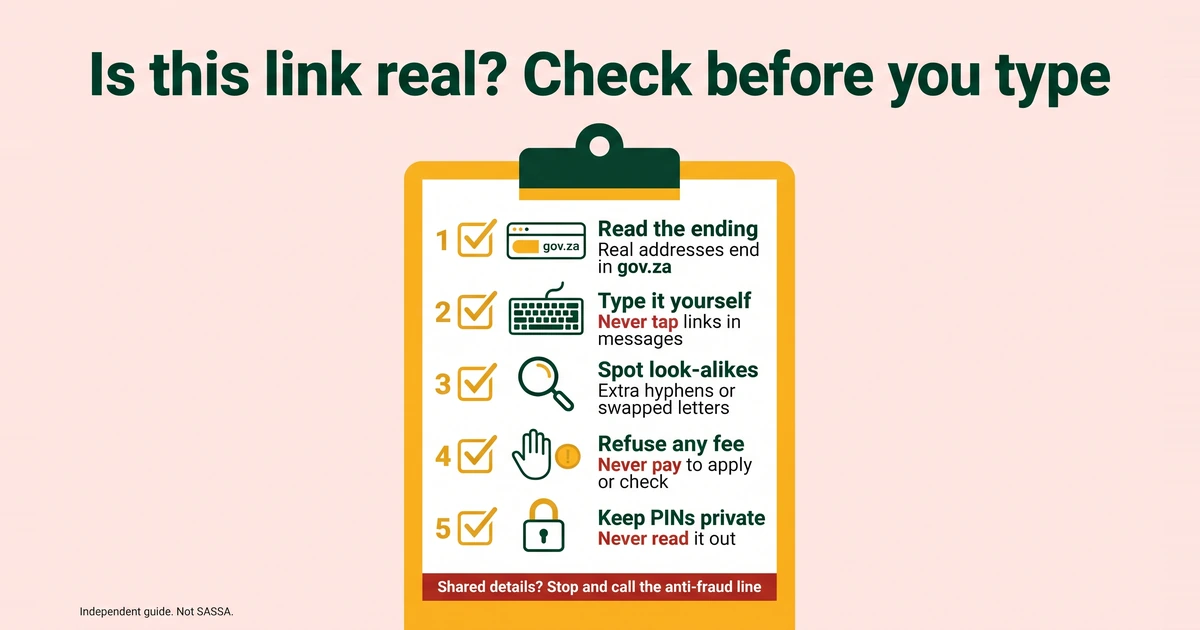
Searching for the SASSA website brings up the real pages and a lot of look-alikes. Some copy the SRD portal so that you will type your ID number, your cellphone number or an OTP. This page lists the real addresses, names the fake sites that SAnews reported, gives you a tool and a checklist for testing any link, and explains what to do if you have already shared your details.
The only official SASSA and SRD addresses
These four addresses come from SASSA’s 2026 booklet and the SRD portal. An address that merely contains the words “SASSA” or “SRD” is not on the list.
| Address | What it is |
|---|---|
| sassa.gov.za | SASSA’s main website, with the office directory and general grant information. |
| srd.sassa.gov.za | The SRD portal: apply, check your status, change banking details or your phone number, and reach the appeals link. |
| services.sassa.gov.za | The grant application portal for grants other than SRD. |
| srd.dsd.gov.za | The Department of Social Development’s SRD appeals address listed in SASSA’s 2026 booklet. |
Addresses SAnews reported as fake SRD application sites (srd-sassa.org.za and srdsassagov.co.za) were named in a SAnews report of 26 February 2025. Do not enter any details on them.
A real SASSA address ends in sassa.gov.za, and the Department of Social Development’s ends in dsd.gov.za. Read an address from the right. In srd.sassa.gov.za, the “srd” part is only a section of sassa.gov.za. In srd-sassa.org.za the ending is .org.za, so it is a different website that happens to use the same words.
A note on the appeals address. SASSA’s booklet lists srd.dsd.gov.za as the appeals address. Our June 2026 portal screenshots show appeals opening under srd.sassa.gov.za/appeals. Both addresses belong to the government, but the safest route is to open the SRD home page yourself and use its “Lodging an appeal” box. Our guide on how to appeal a declined SRD month shows the steps.
The fake sites SAnews named
On 26 February 2025, SAnews, the South African Government News Agency, warned about fake SRD application sites and named two of them: srd-sassa.org.za and srdsassagov.co.za. Do not enter any details on either one.
Two cautions go with that list. First, it is a record from one date, and addresses can change, so an address that is not named is not automatically safe. Second, both names use the right words with the wrong ending, which is the whole trick. We call an address fake only when an official source has named it, and we say which source and when.
Test an address with our link checker
Paste any web address below. The checker compares it with the short list of official domains and the two that SAnews named. It does not open the link, and it does not store what you paste.
Is this link real?
Runs in your browser“On the official list” means the address belongs to SASSA or the Department of Social Development. “Not on the official list” does not prove a scam, but it does mean you should not enter anything. The checker looks at the address only, not at what a message asks you to do, so it gives guidance and not a decision. Even a real address can be quoted in a message that tricks you into sharing a PIN.
Is this link real? A 10-point checklist
This is our own advice, built from the official addresses above and from SAnews warnings.
- Read the ending. A real SASSA address ends in sassa.gov.za. Endings such as .org.za, .co.za, .com or .net are not on the official list.
- Type it yourself. Open your browser and type srd.sassa.gov.za, or use a bookmark. Do not follow a link from a message.
- Look for look-alikes. Extra hyphens, extra words such as “srd-sassa”, swapped letters and missing dots are the classic tricks.
- Check for an @ sign. The browser ignores everything before an @ in an address. Scammers use this to make a bad address look official.
- Be wary of shortened links. A shortened link hides where it leads. If you cannot see the full address, do not open it.
- Ask what it wants from you. In our June 2026 screenshots, the portal’s status check asked for the ID number and the cellphone number used on the application, and did not ask for a PIN. Applying, appealing and changing banking details or a phone number send a 6-digit PIN by SMS to your registered number. So a PIN should appear only after the portal itself sends it, and you should never share it.
- Refuse any fee. Never pay anyone to apply, check, speed up or unlock a grant. The SRD application and status check are free on the official portal.
- Notice the pressure. “Last chance”, “your grant ends today” and “reply within the hour” are written to stop you thinking.
- Say no to helpers. SAnews urged people not to seek help from strangers with identity verification. Use SASSA’s own channels or a SASSA office.
- Compare numbers. A phone or WhatsApp number that is not on SASSA’s list is not SASSA. Check it against the table near the end of this page.
Common scam patterns
Fake application sites
They copy the look of the SRD portal and then ask for your ID number, cellphone number, bank details and an OTP. The SRD grant is applied for only through SASSA’s online channels, and there is no paper form. Our SRD application guide shows the real steps.
“Helpers” who charge
Someone offers to apply for you, to “unblock” a declined month or to speed up a payment, for a fee or for a share of the money. Only SASSA approves and pays the grant, so no helper can honestly promise a result. The helper also learns your ID number and cellphone number, and may ask for your PIN.
Links in messages
A message says your SRD is approved, declined or “on hold” and gives a link. Be careful, because SASSA does send verification links too. SAnews reported on 28 April 2025 that people flagged for identity verification receive an SMS link that must be attended to within 72 hours. You cannot tell a real message from a fake one by how it looks. The safer route is to open srd.sassa.gov.za yourself. SASSA’s booklet says that people with a referred status must log in to the portal and request a link to update their information. See our guide on identity verification that fails.
“Grant ending” videos
Videos and posts claim that the SRD grant is ending and that you must “register now” through a link. SAnews reported on 15 January 2026 that the Department of Social Development said claims that the grant is ending are false. SRD is currently funded to 31 March 2027 at R370 a month. Our guide on whether the SRD grant will end explains what is known and what is not.
Look-alike phone numbers
Scammers can set up phone or WhatsApp numbers that differ from SASSA’s by a digit or two. The real numbers are also confusing, because the WhatsApp number printed in 2025 was not the one in the 2026 booklet. An April 2025 SAnews report printed 082 046 8553. SASSA’s 2026 booklet prints 082 054 0016, and that is the number we show. We cannot tell from outside which number is in use today, so confirm it with the call centre on 0800 60 10 11 before you send anything. Our page on the SASSA WhatsApp number follows this.
What to do if you already entered details or your ID was used
- Stop. Do not send any more information or any money, and do not reply to the sender.
- Keep the evidence. Take screenshots of the website with the address bar showing, the message, the sender’s number and any proof of payment. Do not delete anything.
- Report it to SASSA. Call the anti-fraud line on 0800 701 701. SASSA’s booklet says suspected fraud can also be reported anonymously through the call centre on 0800 60 10 11 or by email to [email protected].
- Tell your bank. If you shared bank details, card details or an OTP, or if money has moved, contact your bank at once, using the number on your card or in your banking app. Ask what it can do and how long it will take.
- Check your SRD record. Open srd.sassa.gov.za yourself and look at your status. A PIN is needed to change banking details or a phone number, so if someone had your PIN, they may have changed them. If you find a change you did not make, say so when you report it to SASSA.
- If your ID was used. If SASSA tells you that an application or payment exists that you did not make, or you think someone else has used your ID number, report it through the channels above. Keep every message and ask SASSA what it needs from you. You can also report it to the police.
- Do not pay a “recovery” service. Anyone who promises to get your money back for a fee is probably the next scam.
Official numbers and addresses to use instead
These contact details come from SASSA’s 2026 booklet. Call-centre hours are weekday working hours, so confirm them on sassa.gov.za. The booklet also lists SASSA’s social channels: X @OfficialSASSA, Instagram official_sassa, YouTube @SASSATV and a WhatsApp channel.
| Channel | Contact | Last verified |
|---|---|---|
| Call centre (toll-free) | 0800 60 10 11 | 02 Nov 2026 |
| Anti-fraud line | 0800 701 701 | 02 Nov 2026 |
| WhatsApp chatbot (2026 booklet) | 082 054 0016 | 02 Nov 2026 |
| [email protected] | 02 Nov 2026 | |
| Main website | sassa.gov.za | 02 Nov 2026 |
| Grant application portal | services.sassa.gov.za | 02 Nov 2026 |
| SRD portal | srd.sassa.gov.za | 02 Nov 2026 |
Anything not on this list should be treated as unverified.
More detail, including office details, is on our pages for SASSA contact numbers and the SASSA WhatsApp number.
Our own commitments
- We never ask you to log in to our site, and we never ask for your ID number, phone number, PIN, OTP or bank details. Our tools run in your browser, and nothing you type is stored or sent.
- Our buttons for checking, applying or appealing point to the official portal at srd.sassa.gov.za.
- We will never phone, WhatsApp or SMS you to ask for money or personal details.
- We name a site as fake only when an official source has named it, and we show the source and date. Our editorial policy explains how we check, and we review official contacts every week.
- If you see a site pretending to be ours, please tell us.