

People search for “SASSA change banking details” when a payment has gone missing, when they have moved to a new bank, or when their status shows a bank problem. The fix is the same each time: open the official SRD page yourself, confirm with a PIN sent to your registered phone, and submit an account that is open, active and in your own name. It takes a few minutes. Small slips in the details are the easiest thing to prevent, so this guide spends as much time on checking as on typing.
What do you need before you start?
Have these ready, so you are not hunting for a document halfway through:
- An account in your own name. SASSA’s banking page states that it cannot pay your grant into another person’s bank account. That rules out a partner’s, a parent’s, a friend’s or a “helper’s” account.
- An account that is open and active. A closed account cannot receive money. If you are not sure, ask your bank whether the account is open and can receive deposits.
- Your names and surname exactly as on your ID. Use the spelling printed on the document, not the name people call you.
- The phone and SIM registered on your SRD application. The PIN is sent there by SMS. If that number is lost or old, sort it out first with our guide to changing your SRD phone number.
- Your 13-digit ID number. The portal asks for it before it sends the PIN.
- Your account details from your bank’s own paperwork: the account number, the bank, the branch and the account type. A bank letter or recent statement is the best source. Keep a photo of it.
Tick these off with the checklist below. It runs in your browser and stores nothing.
Banking and details checklist
PrintableHow do you change SASSA banking details, step by step?
The screenshots below were taken on the SRD banking page in June 2026, on a computer and on a phone. Your screens may look slightly different.
How to change your SRD banking details
To change your SRD banking details, use the banking details button on the official SRD page. The account must be in your own name, and a PIN is sent to the phone number you registered with.
-
Find the banking details button
On the SRD home page, scroll to “How can I change my Banking details” and press the yellow “click here to change your Banking details” button.

-
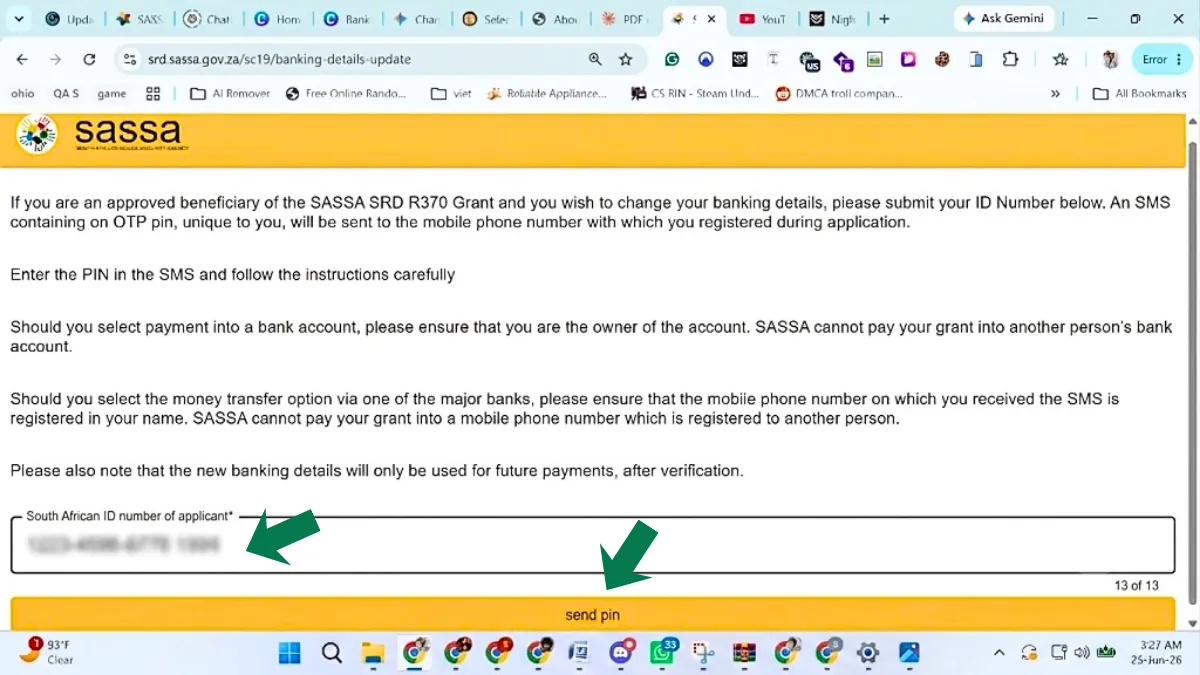
Enter your ID number
Type your 13-digit ID number and press “send pin”. The page reminds you that the PIN goes to the mobile number you registered with.
-
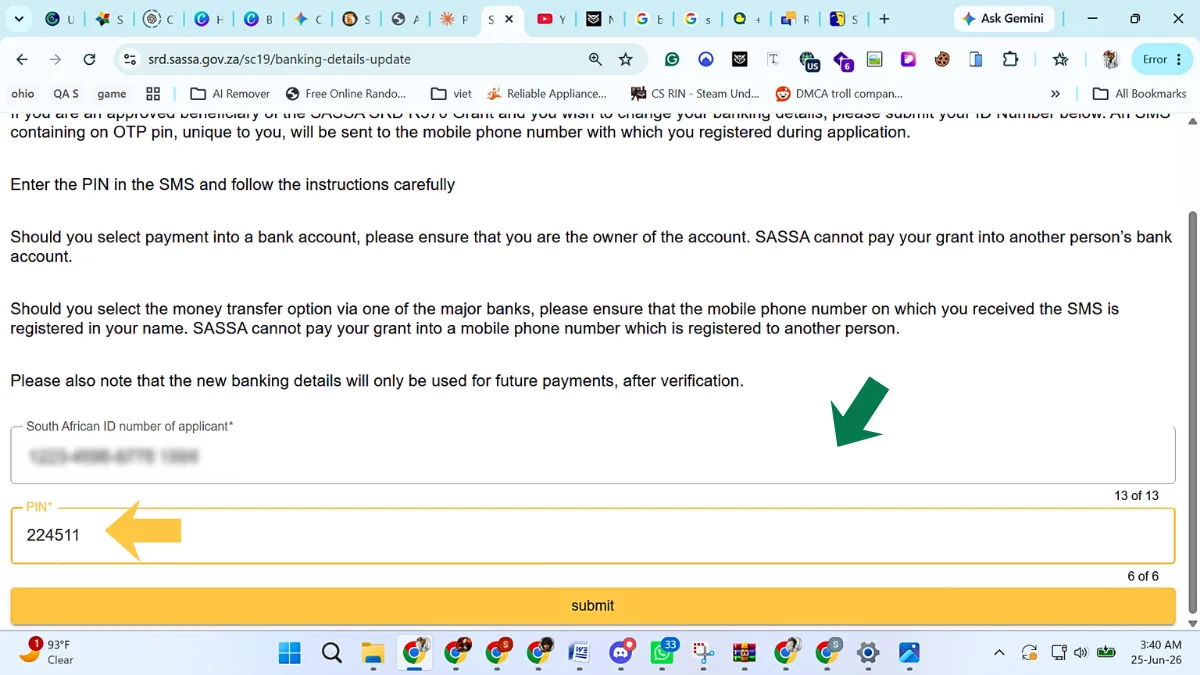
Type the PIN
Enter the PIN from the SMS in the PIN box and press submit.
-
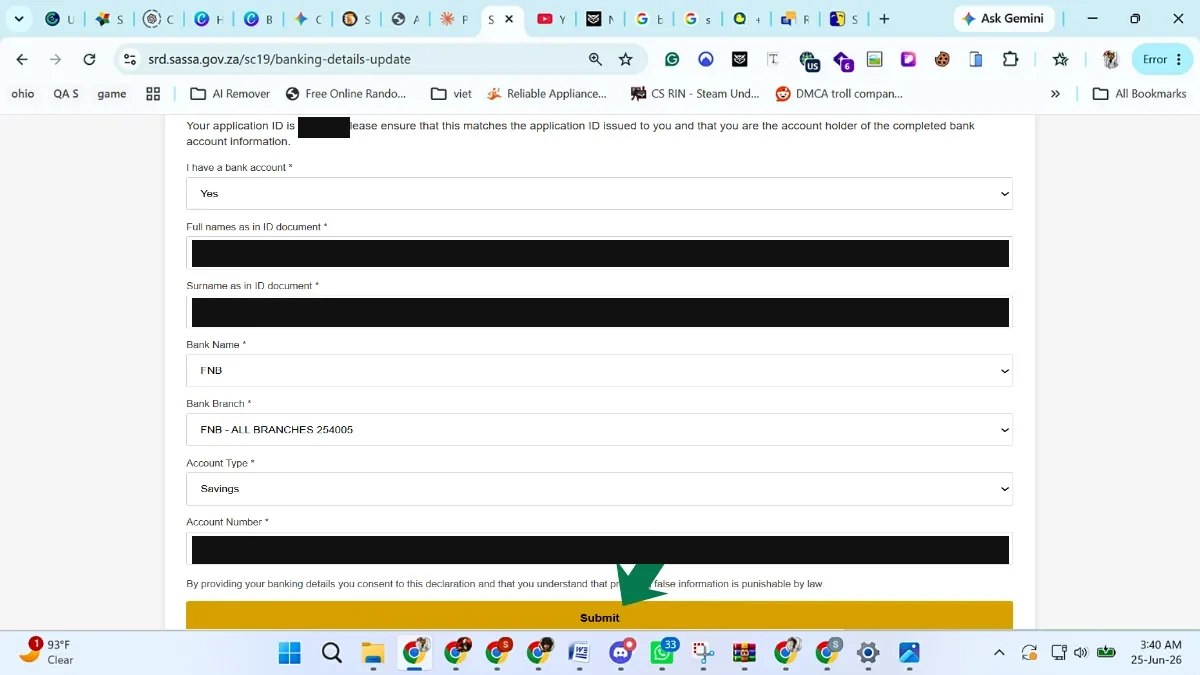
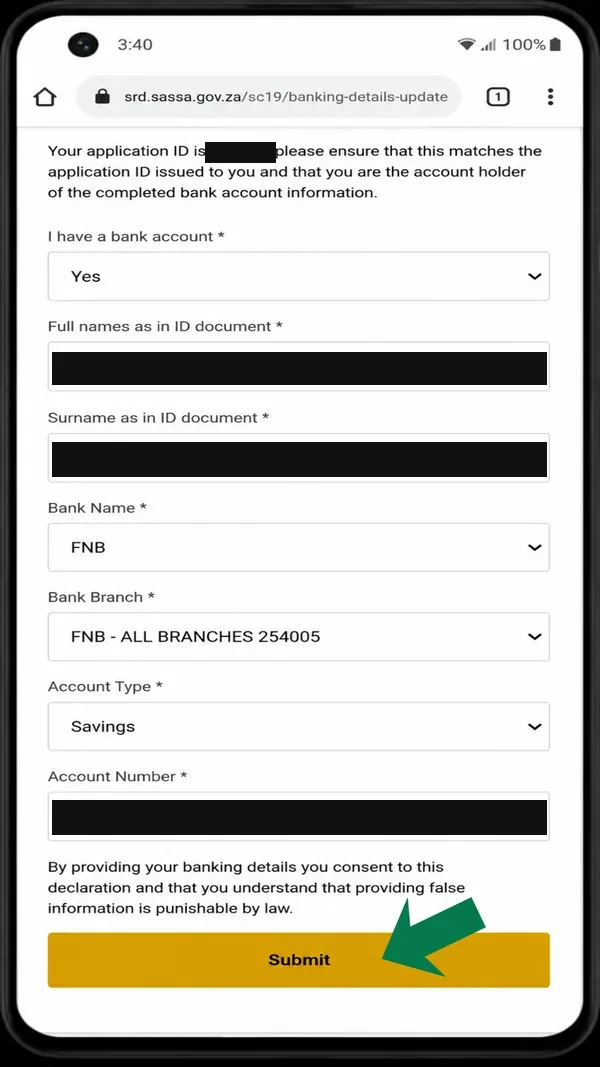
Enter your new bank details
Answer “I have a bank account”, type your full names and surname as on your ID, pick your bank, branch and account type, and type the account number. Read the declaration and press Submit.
-
Find the banking details button
On the SRD home page, scroll to “How can I change my Banking details” and tap the yellow button.

-
Enter your ID number
Type your 13-digit ID number and tap “send pin”.

-
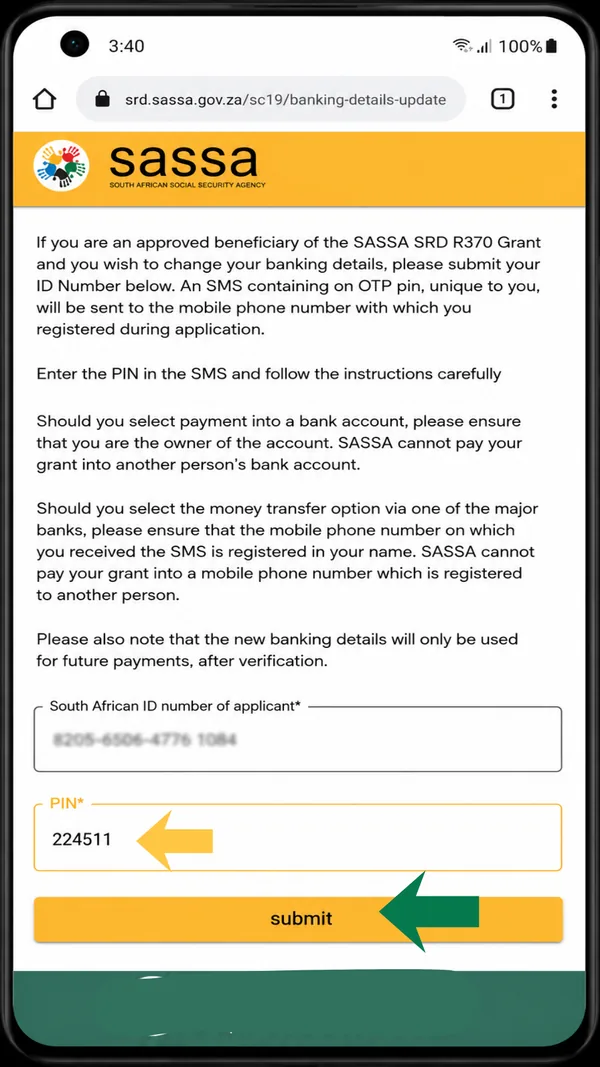
Type the PIN
Enter the PIN from the SMS and tap submit.
-
Enter your new bank details
Fill in your names, bank, branch, account type and account number, then tap Submit.
SASSA’s page states that it cannot pay your grant into another person’s bank account, so the account must be in your own name.
In plain words, with the points where people slip:
- Start on the SRD home page. Type the address into your browser, scroll to “How can I change my Banking details” and use the yellow button. Do not search for a shortcut. The page on the banking details link explains why.
- Enter your ID number and ask for a PIN. The page says the PIN goes to the mobile number you registered with. If you cannot receive SMS on that number, you cannot continue.
- Type the 6-digit PIN. It belongs to this one action. Nobody from SASSA, a bank or a helper needs to hear it from you.
- Fill in the bank form. Choose “I have a bank account”, then enter your full names and surname as on your ID, the bank, the branch, the account type and the account number.
- Read the declaration, then submit. Read what you are agreeing to before you press the button.
- Screenshot whatever the page shows next. We have not captured a confirmation screen, so we cannot tell you what yours will say. A screenshot gives you something to show the call centre later.
What should you check before you submit?
The form compares what you type with records, so one wrong character is enough to cause trouble. Use this table as a last look.
| Field | What to enter | A common slip |
|---|---|---|
| Names and surname | Exactly as printed on your ID | A nickname, swapped names, a missing second name |
| Bank | The bank that holds your account | Picking a similar-sounding bank name |
| Branch | The branch shown on your bank’s own paperwork | Guessing the branch |
| Account type | The type your bank lists for your account | Choosing the first option in the list |
| Account number | Digit by digit from your bank app, letter or statement | A swapped digit or a stray space |
Two more checks catch what the table does not:
- Compare against the source, not your memory. Read the account number from your bank’s own record, not from a chat message someone sent you.
- Check that your ID and your bank agree. If your surname has changed, for example after marriage, ask the bank to update its record before you submit, or the two names may not match.
The form in our screenshots did not ask for a card number, a card PIN or an online banking password. If a page asks for any of those, close it.
What happens after you submit?
Your status may keep showing a bank problem for a while. SASSA publishes no official processing time for a banking details change. This is practical advice, not an official rule: after one clean submission, give it about a week before you decide it has failed, and check your status no more than once a day.
Do not change the details again and again. Repeated changes make your own record hard to read. Resubmit only if you find a real mistake, and then once. Again, this is our advice and not a SASSA rule.
Check the result the normal way. Use the status page on the official portal, which shows one card per month. Our guide to every way to check your SRD status lists the options.
Which payment does the change affect?
SRD is reassessed every month, and each month has its own card and its own pay day. SASSA does not publish a cut-off for banking changes that we know of. Our reading, which is not an official rule, is that a change saved after SASSA has already prepared a month’s payment may only take effect from the next month. If a payment is close, submit the change, then phone 0800 60 10 11 and ask which account will be used. When the money is due, check your own bank statement for the arrival date. Banks differ, and we give no bank-by-bank timelines.
Can a face check be required?
In some cases, yes. SASSA’s 2026 booklet says that if your status shows approved but not paid, you must request a verification link and complete facial recognition. It asks for the same check from people with a referred status and from people who change their cellphone number. We have seen nothing saying that a banking change on its own triggers one, but the portal may ask. If it does, complete it on the official portal and nowhere else. For the payment side, see approved but no payment.
What should you never do?
- Never give your card or PIN to a helper. A neighbour, an “agent” at a shop or a stranger online can empty an account with them.
- Never use someone else’s account. SASSA’s page says it cannot pay into another person’s account, and a borrowed account also puts your money in their hands.
- Never pay to apply, check or speed up a grant. The SRD application and status check are free on the official portal. This is our safety advice, and the fee request alone tells you it is a scam.
- Never follow a banking link from a message. Type the address yourself.
- Never forward the PIN SMS or a screenshot of it.
- Never submit someone else’s details or your own to a site that is not on the official list. The official addresses are sassa.gov.za, srd.sassa.gov.za, services.sassa.gov.za and srd.dsd.gov.za.
What if you do not have a suitable account?
Open one in your own name before you start. Ask the bank what it needs, and take your original ID. Do not hand your ID and PIN to someone else to “sort it out”. Our guide to the SASSA Gold Card and Postbank covers card-based payments.
If you bank with Capitec or TymeBank, see our Capitec and TymeBank guides. The SASSA side of the process stays the same.
When should you call or write to SASSA?
Contact SASSA if any of these apply:
- The PIN never arrives and the registered number is still yours.
- You submitted a clean change and your status still shows a bank problem after a week or more.
- You are not sure which account will be used for a payment that is due.
- You think someone else has changed your details.
The call centre is toll-free on 0800 60 10 11. SASSA’s hours are weekday working hours, so confirm on sassa.gov.za. You can also email [email protected]. Put your application ID and a screenshot in the email, and never your PIN, OTP or card details. To report suspected fraud, use the anti-fraud line, 0800 701 701. A full list is on our SASSA contact numbers page.