
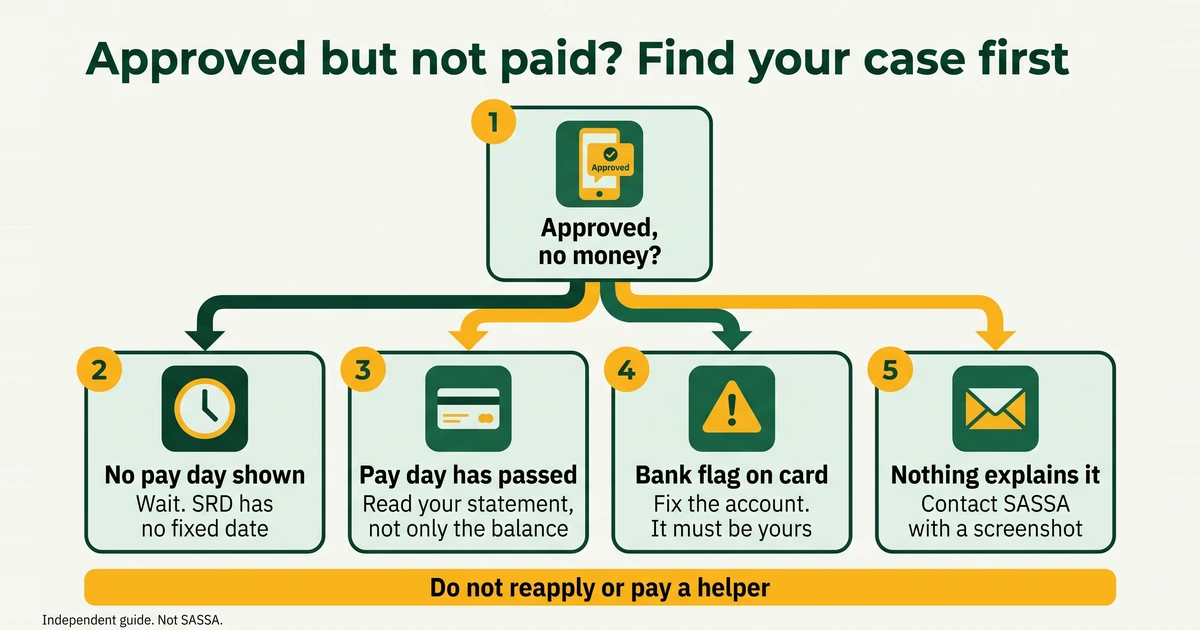
The words SASSA status check approved but no payment cover three different situations, and the fix depends on which one you are in. Approved only means you passed the checks for that month. It does not mean the money has been paid, and it does not always come with a day. Read the table below, find your case, then follow the numbered steps. We last checked this guide on 2 November 2026.
Which of the three situations are you in?
| Situation | What you see | What it can mean | Steps |
|---|---|---|---|
| A. Approved, no pay day shown yet | The card says approved and has no pay-day line, or the pay day is still ahead | SASSA publishes no fixed SRD date, so your window may not have opened | 1 to 3 |
| B. Pay day passed, no money | The card shows a pay day and that date is behind you | The money may be with your bank, may have been used by a debit order or fee, or may be held by a verification or bank problem | 4 to 7 |
| C. A bank problem | The card, or a message, says bank details are pending or verification failed | SASSA has no account it can pay into, or the bank could not confirm the one on file | 5 |
A note on what we have seen. In our June 2026 screenshots, approved months carried a pay day. If your approved card has none, SASSA’s published sources do not explain why, so the steps below are practical checks and not an official diagnosis. Your screens may look slightly different.
How do you work out what is wrong, step by step?
Go in order and stop when you find the cause.
- Check that you are reading the right card. The status page shows one card for each month, tagged like “MAY2026”, and SRD is reassessed every month. An approved earlier month does not mean this month is approved. Read the month, then the result word.
- Look for the pay-day line on your card. On the computer layout our screenshots read “Your application has been approved and your payday is 15, JUN2026”, and the phone layout read “payment date: Day 28 of JUN2026”. Take a screenshot of your card with today’s date visible, whether or not the line is there.
- If there is no day, or it is ahead of you, wait for it. SASSA does not publish a fixed SRD date, and having no money before your pay day is not a fault. Our SRD payment dates guide shows the labelled window for the month. An Estimated window is not a SASSA date, so use it only to know when to look again.
- If the pay day has passed, read your bank statement, not only the balance. Look for a credit on or after the pay day. The money may have arrived and been taken by a debit order or a fee. Our guide to checking your SRD balance shows how to tell. We have no verified bank timelines, so ask your bank how long an incoming grant payment takes.
- Look for a bank flag. If the card says bank details are pending or verification failed, SASSA cannot pay until the account is fixed. The account must be open and in your own name, because SASSA cannot pay into another person’s account. Use change your SASSA banking details and read SRD bank verification failed for the usual causes.
- Check for a verification step. SASSA’s booklet sets rules for approved but not paid, for referred, and for a changed cellphone number. They are explained in the next section.
- If nothing explains it, contact SASSA with your evidence. The contact steps are further down this page.
Prefer to answer a few questions instead? The walk-through below covers the pay window, the bank account, a bank flag and the verification link, and it points you to the right guide for each answer.
Approved-but-unpaid troubleshooter
Runs in your browserWhat do the verification link and facial recognition rules say?
SASSA’s 2026 booklet is the source for three rules, and each one can leave a month approved but unpaid:
- Approved but not paid. An applicant whose status shows this must request a verification link and complete facial recognition.
- Referred. If your card says referred, log in to the SRD portal, ask for the link that lets you update your information, and complete the facial biometric check.
- A changed cellphone number. Anyone who changes their number must also complete facial recognition verification.
New applicants must pass the same biometric check (eKYC) before approval. On the portal’s SRD home page, e-KYC is one of the options listed, so start there and not from a link sent by a stranger. Your screens may look slightly different.
Time can matter. SAnews reported in April 2025 that people whose identity is flagged for checking are sent an SMS link, and that it must be dealt with within 72 hours. Do not leave a verification message unread. If you have no smartphone, laptop or data, SASSA Mpumalanga said in January 2026 that its offices can help you complete the check. Take your original ID.
Can an approved month lapse? The 90-day wording
Among the reasons a grant can lapse, SASSA’s booklet includes “not claimed within 90 days of approval”. The booklet is written for social grants in general, so confirm with SASSA how that wording applies to SRD months before you rely on it, and do not treat it as an official SRD deadline.
What you can do is act early. A stuck month is easier to sort out while your screenshots, statements and messages are recent. Do not leave an approved month sitting while you hope it resolves itself.
How do you contact SASSA about an approved month that was not paid?
Use the official channels only.
| Channel | Contact | Last verified |
|---|---|---|
| Call centre (toll-free) | 0800 60 10 11 | 02 Nov 2026 |
| Anti-fraud line | 0800 701 701 | 02 Nov 2026 |
| WhatsApp chatbot (2026 booklet) | 082 054 0016 | 02 Nov 2026 |
| [email protected] | 02 Nov 2026 | |
| Main website | sassa.gov.za | 02 Nov 2026 |
| Grant application portal | services.sassa.gov.za | 02 Nov 2026 |
| SRD portal | srd.sassa.gov.za | 02 Nov 2026 |
Anything not on this list should be treated as unverified.
The WhatsApp number above is the one printed in SASSA’s 2026 booklet. An April 2025 SAnews report printed a different number, 082 046 8553, so use the booklet’s. Our SASSA WhatsApp number guide explains the difference, and our SASSA contact numbers page lists every verified channel.
By phone
Call the toll-free call centre on 0800 60 10 11. Think of it as weekday working hours and confirm on sassa.gov.za, because we do not print exact hours. Have your status card open, and write down the date, the name of the agent and any reference number you are given.
By email, with a screenshot
Write to [email protected] and type the address yourself. Use a clear subject line, such as “SRD approved but not paid”. In the message, include:
- your full name as it appears on your ID, and your ID number, so that SASSA can find your record
- the cellphone number on your application
- a screenshot of the status card that shows the month, the result and the pay-day line, if there is one
- the date you checked, and the pay day that has passed, if you have one
- the name of your bank, and whether you changed your banking details or cellphone number recently
- what you have already done, such as checking your statement or completing the verification
SASSA publishes no official reply time, so keep a copy of what you sent. Never put a PIN, an OTP or a photo of your bank card in an email. If you cannot get through, you can take your original ID to a SASSA office, and our SASSA offices near me guide explains the directory.
What should you not do while you wait?
- Do not reapply. Reapplying does not make an approved month pay sooner. Reapply only if the portal itself says your application has expired or been cancelled. See SRD reapplication.
- Do not pay a helper. Never pay anyone to apply, check or speed up a grant. The SRD application and the status check are free on the official portal. A person who offers to “unblock” your payment for a fee is a scammer, and you can report suspected fraud on 0800 701 701.
- Do not appeal an approved month. An appeal is for a declined month, and you pick the declined month on the portal. If your month is approved there is nothing to appeal. See how to appeal a declined SRD month if another month was declined.
- Do not share your PIN or OTP. The portal sends a 6-digit PIN by SMS for changes such as banking details and your phone number. Keep it to yourself.
- Do not assume the money is lost. An approved month stays on your card. Work through the steps and contact SASSA.