
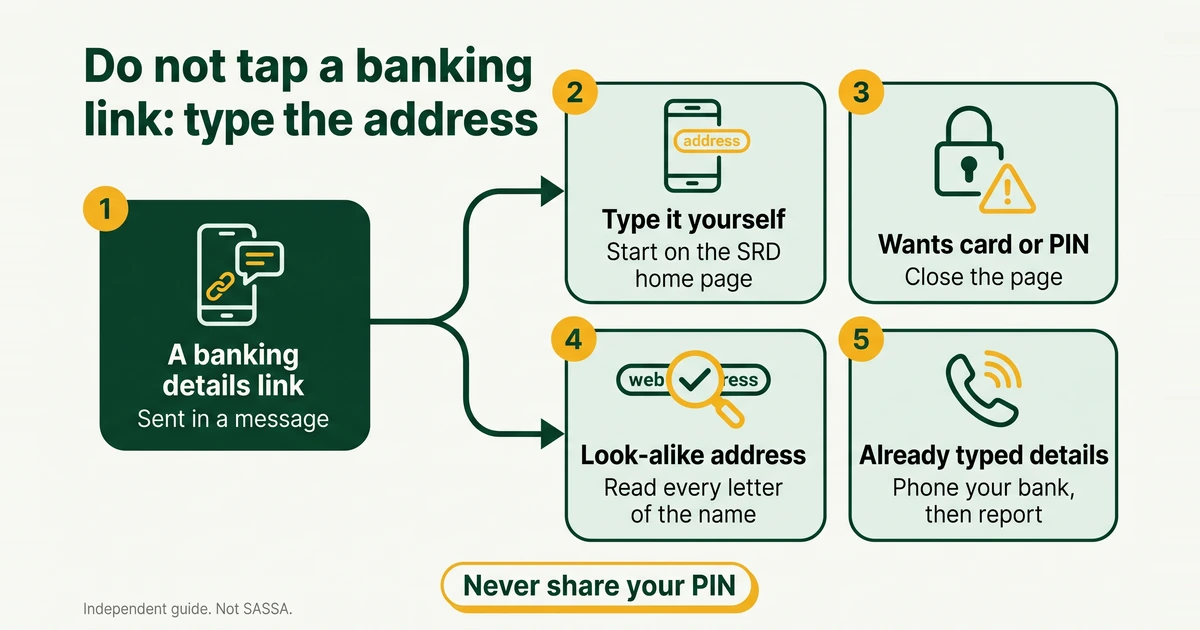
When people search for a SASSA banking details link, they hope for one web address that opens the update form. The honest answer is that there is no special link to wait for, save or forward. The update page sits inside the SRD portal, and the safe way in is to type srd.sassa.gov.za yourself. Everything else, and especially a link that lands in WhatsApp or SMS, deserves suspicion until you have checked it.
How do you reach the official banking details page?
- Open your browser. Do not start from a message, a search advert or a shared post.
- Type srd.sassa.gov.za into the address bar yourself.
- Scroll to “How can I change my Banking details”. It is a box on the SRD home page.
- Press the yellow button that says “click here to change your Banking details”.
- Check the address bar once the page loads. It should still be on a SASSA address from the list below.
From there the page asks for your ID number, sends a 6-digit PIN to your registered phone and then asks for your bank details. Our guide to changing your SASSA banking details walks through every field. We do not print a deeper address for the form itself, because portal pages can move. The home page is the dependable starting point. Your screens may look slightly different.
The official addresses we can confirm are:
- sassa.gov.za, the main SASSA website.
- srd.sassa.gov.za, the SRD portal. This is where the SRD banking change lives.
- services.sassa.gov.za, the grant application portal for non-SRD grants. Do not expect to change SRD banking details here.
- srd.dsd.gov.za, the appeals address in SASSA’s 2026 booklet.
How can you tell a fake banking details link?
SAnews warned on 26 February 2025 about fake SRD application sites and named two: srd-sassa.org.za and srdsassagov.co.za. Both are copies of the real thing at a similar-looking address. Nothing stops the same trick being used for a banking page. These are the signs to look for.
- A look-alike address. Swapped letters, an added hyphen, or an ending such as .org.za or .co.za where the real address ends in gov.za. All four official addresses end in gov.za, but that alone proves nothing, so read the whole name.
- It arrived in a message. Links in WhatsApp groups, SMS, email and social media posts are the usual route. Lines such as “update now or your grant stops” or “claim your back pay” are pressure, and pressure is a warning sign. This is our safety advice, not a SASSA statement.
- It asks for more than the real flow does. In our June 2026 screenshots, the page asked for an ID number, sent a PIN to your phone and then asked for names, bank, branch, account type and account number. It did not ask for a card number, a card PIN or an online banking password. Anything beyond that is a red flag.
- It asks for money. A “registration”, “unlock” or “verification” fee is never part of the process. Never pay anyone to apply, check or speed up a grant.
- Someone insists on “helping”. SAnews has urged people not to seek help from strangers. A helper who wants your phone, your ID and your PIN is a risk, not a service.
- A shortened link. It hides where you are going. Do not tap it.
- A padlock or polished design. Neither proves a page is real. Fake sites can look perfect.
What is your checklist before you type anything?
- Did I type the address myself, rather than tap a link?
- Does the address bar show one of the four official addresses, spelled exactly?
- Did I reach the banking page from the SRD home page button?
- Is the page asking only for what the real flow asks for?
- Is anyone pressuring me, or asking for a fee, my card or my PIN?
- Is my PIN going only into this page, and not to a person?
- Am I using my own phone and my own account?
If any answer worries you, stop and start again from step 1 above.
Can you test an address before you open it?
Paste only the web address, never your ID number, PIN or bank details, into the checker below.
Is this link real?
Runs in your browserThe checker compares the address with the official list and with the two fake sites SAnews named. It does not open the link. A pass tells you the address is on the list, not that a message is genuine, so still type the address yourself.
What if the official page will not load?
Do not switch to another site. Check that you typed the address correctly, then try again on a different connection, such as mobile data instead of Wi-Fi, or later in the day. Portal pages can be slow or unavailable at times. If the page still fails, see our guide to SRD portal, login and website help or call the call centre on 0800 60 10 11. If your status already shows a bank problem, bank verification failed explains the usual causes.
What if you already entered details on a fake page?
Act in this order:
- Stop. Enter nothing more and do not confirm anything.
- Phone your bank. Use the number on your bank card or inside your bank’s official app, never a number from the message. Tell them what you entered and ask them to protect the account.
- Report it. Call the SASSA anti-fraud line on 0800 701 701. The booklet says suspected fraud can also be reported anonymously through the call centre on 0800 60 10 11 or by email to [email protected].
- Keep the evidence. Save screenshots of the message, take a photo of the address bar, and note the time. Do not delete the message.
- Tell SASSA if you shared a PIN or OTP. A PIN or OTP may let someone act on your application, so mention it when you report.
- Watch your bank account and your SMS messages, and check your SRD status on the official portal.
- Ask your bank whether you should also open a police case.
Where to go next
- The full step-by-step is in our guide to changing your SASSA banking details.
- If your status shows a bank problem, read bank verification failed: causes and fixes.
- If the PIN never arrives, see OTP and PIN problems.
- To check your status once the change is saved, see every way to check your SRD status.
- For a wider list of real and fake addresses, see official SASSA links and the scam warning.