
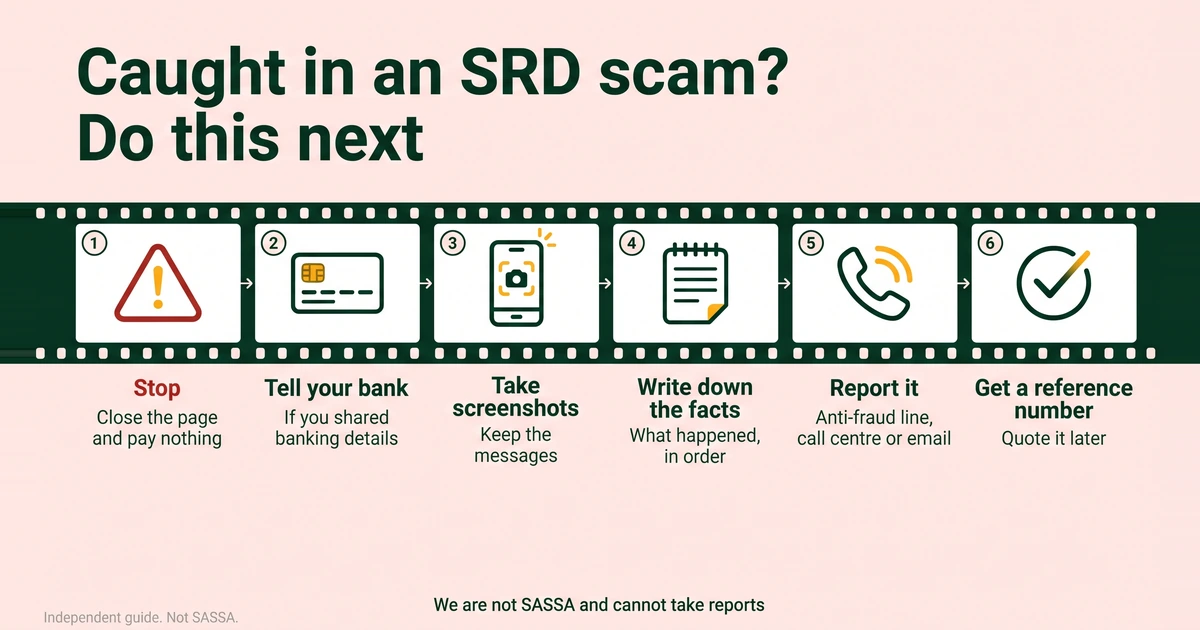
This guide is for anyone who has received, or fallen for, a message, call or website that claims to be about the SRD grant. Reporting takes a few minutes if you have your facts ready. We are not SASSA and cannot take reports, so please do not send them to us.
Who to contact
SASSA’s 2026 booklet lists these routes. Phone the number yourself from this page or from sassa.gov.za. Never use a number that a caller or a message gives you.
- Anti-fraud line: 0800 701 701. This is SASSA’s line for suspected fraud. Confirm opening hours on sassa.gov.za, and if nobody answers, try again or use another route.
- Call centre: 0800 60 10 11 (toll-free). The booklet says suspected fraud can also be reported anonymously through the call centre. It runs in weekday working hours, so confirm the hours on sassa.gov.za.
- Email: [email protected]. The booklet says suspected fraud can be reported anonymously by email too.
Our SASSA contact numbers page and the official links and scam warning page keep these in one place.
What to include in your report
Write it down first, then read it out or paste it in. Put the facts in order:
- How it started. An SMS, a WhatsApp message, a phone call, a social media post or a website, and the date and time.
- Who it came from. The phone number, name, web address or social media handle, copied exactly as it appeared.
- What they asked for. Money, your PIN, an OTP, your ID document, banking details or a click on a link.
- What you did. Whether you clicked, typed anything or paid, and in what order.
- Any money lost. The amount, the date and which bank was involved.
- How to reach you, if you want a reply. Leave this out if you want to stay anonymous through the call centre or email.
What to keep
Do not delete anything until you have reported it and written down your reference numbers.
- Screenshots. Take the whole screen, including the address bar for a website or the sender’s name for a chat.
- The messages themselves. Keep SMS and WhatsApp threads and voice notes. Do not edit or crop them.
- Reference numbers. Ask for one when you report to SASSA, when you tell your bank and if you open a police case. Write the date, the time and the agent’s name beside it.
- Bank statements and bank SMS alerts. They show payments or debits you do not recognise.
Is a verification message real or a scam?
Genuine checks exist. SAnews reported on 28 April 2025 that people flagged for identity verification receive an SMS link, and that it must be attended to within 72 hours. So a time limit alone does not make a message fake. Do not tap a link blindly, and do not ask strangers for help with it. Log in at srd.sassa.gov.za yourself and see whether your application asks for verification. If your status is referred, the booklet says to log in, request a link and complete the facial check. Our guide to SRD identity verification walks through it. If a message asks for money or your PIN, report it.
What if you entered details on a fake site?
SAnews named two fake SRD application sites on 26 February 2025: srd-sassa.org.za and srdsassagov.co.za. Do not enter details on either. Look-alikes are not limited to those two, so these steps apply to any site you now doubt.
- Stop. Close the page. Do not type anything else, tap more links or pay anything.
- Tell your bank straight away if you typed banking details, card details or your banking app login. Ask the bank to help you secure the account.
- Take a screenshot of the page and note the address before you leave it. Do not visit it again.
- Report it on the anti-fraud line, to the call centre or by email.
- Check your real application. Type srd.sassa.gov.za yourself and look at your status, using every way to check SRD status if you need another route. If something looks wrong, tell the call centre.
- If you shared a PIN or OTP, say so when you report. The PIN sent to your phone confirms actions such as changing banking details or changing your SRD phone number, so ask what to check.
- Ignore “recovery” offers. Anyone who contacts you offering to get your money back or unblock your grant for a fee is another scammer.
What if your ID was used?
We have not found an official step-by-step process for identity misuse, so we will not invent one. These are practical steps:
- Look for signs. An SMS with a PIN you did not ask for, a message about an application you did not make, or a result on your status that you do not recognise.
- Report it clearly. Tell the anti-fraud line or the call centre that your ID may have been used, and ask what they need from you.
- Go in person if you are asked to. Offices need your original ID. Find yours in the directory on sassa.gov.za.
- Tell your bank if any banking details were involved.
- Keep checking. SRD is reassessed every month, so look at your status on the official portal each month. Our guide to what each SRD status means helps you read it.
If you decide to open a police case, keep the case number with your other records.
How to protect your bank account
Your bank is the one that can act on your account. SASSA cannot.
- Tell your bank if you paid someone, shared details or see unknown debits. Ask what it can do and what it needs from you. Timelines differ, and we cannot give one.
- Never share your banking app PIN, password or OTP with anyone, including someone who says they work for your bank or for SASSA.
- Use an account in your own name. SASSA cannot pay into another person’s account. Anyone who asks you to move “grant money” to a different account is running a scam.
What happens after you report
We cannot say what SASSA does with a report or how long any step takes, and we will not promise an outcome, including whether money can be recovered. What you can do is ask for a reference number, write it down and quote it if you contact SASSA again about the same case.