
SASSA runs an automated chatbot on WhatsApp, and it is the easiest route for people who have Wi-Fi at home or work but no mobile data. You type a few messages instead of working through a website, and the bot answers with a basic result. This guide gives the right number, the safe order of messages, and the checks that tell you whether you are talking to the real thing.
The official WhatsApp numbers, and which one to use
Two numbers have been printed, and they come from different dates.
| Number | Where it appeared | Our advice |
|---|---|---|
| 082 054 0016 | SASSA’s 2026 “You and Your Grant” booklet | Use this one |
| 082 046 8553 | An April 2025 SAnews report | Older. We cannot confirm today whether it still answers |
If you saved the older number in 2025, add the booklet number as well and use that. Our SASSA WhatsApp number guide tracks the dating, and we will switch the number on this page only if SASSA confirms a change.
Who the WhatsApp route suits
It suits you if you have a smartphone with WhatsApp installed and Wi-Fi, because WhatsApp can run on Wi-Fi alone. It is also a handy second route when the portal is slow.
It does not suit you if you have a basic phone, in which case the toll-free call centre on 0800 60 10 11 is the better choice. And it is the wrong tool for anything that needs a PIN: appeals, banking changes and phone number changes all happen on the portal.
What you need before you open the chat
- WhatsApp installed and working on your phone, with Wi-Fi connected or data available.
- Your ID document, so you can type the 13 digits without guessing.
- The phone number you used on your application, which may not be the number in your hand today. Think back to which handset received the SMS PIN when you applied.
- A few minutes. The bot may put you in a queue.
If you are using a borrowed or shared phone, delete the chat when you finish, because it will keep your ID number and phone number for the next person who opens it.
Step by step: the safe flow
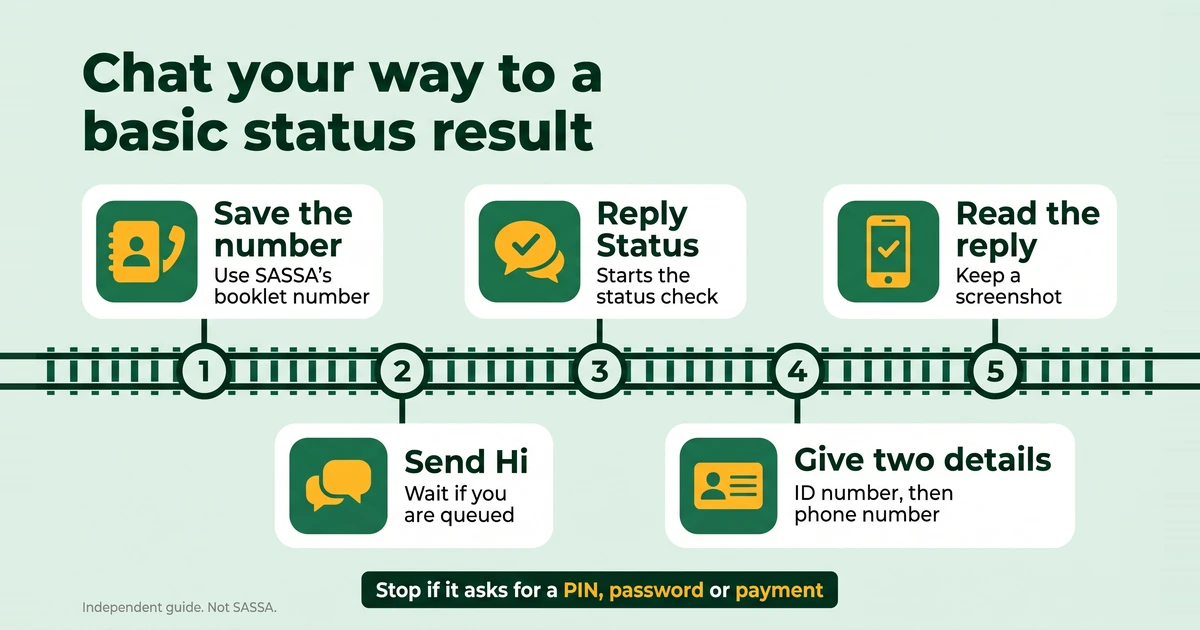
- Save the number. Type 082 054 0016 into your contacts yourself, and name it something you will recognise. Do not save a number from a forwarded contact card, a poster or a group message.
- Say hi. Open WhatsApp, start a chat with that contact and send “Hi”. The bot may tell you that you are in a queue. Wait, and do not keep sending messages.
- Reply “Status”. That starts the automated status check.
- Give your ID number when the bot asks for it. It has 13 digits and no spaces.
- Give your phone number when the bot asks for it. Use the 10-digit number from your application.
- Read the reply. Note which month it refers to and take a screenshot, with your ID number cropped out.
The bot’s prompts can change, so the wording you see may differ from this list. Follow what is on your screen, but only for as long as it asks for your ID number and your phone number. It never needs a PIN, a password or an OTP.
What the reply tells you, and what it does not
Expect a basic result: whether the application is approved, pending or declined. That is enough to know where you stand, but it is thin. The portal shows a card for every month, a pay day on approved months and, for declined months, the reason. If you need any of those, use the portal.
Take the word you were given to our guide on what each SRD status means, which sets out the next step for each. A WhatsApp reply is not an appeal and cannot change a result. If a month was declined and you think it is wrong, see how to appeal.
If the bot does not answer
- Check the number you saved against 082 054 0016, digit by digit.
- Make sure WhatsApp itself works. Open another chat and see whether a message goes through.
- If the bot said you are in a queue, wait a few minutes before you send anything else.
- Try again later in the day, or on another day.
- In the meantime use the portal, or call 0800 60 10 11, which is toll-free and runs in weekday working hours. Confirm the times on sassa.gov.za, and see the SASSA contact numbers for the other verified channels.
- Do not follow a number that someone sends you, and do not answer “agents” who message you first.
If the portal also fails, our guide to a failed SASSA status check helps you work out whether the fault is on your side.
How to confirm you are talking to the real chatbot
Run through these checks every time:
- The number matches. It must match the 2026 booklet digit by digit, or the older number from the April 2025 SAnews report. Anything else, do not use.
- You started the chat. Treat any unexpected message that claims to be from SASSA as suspect.
- It asks only for two things. An ID number and a phone number. Never a PIN, a password, an OTP, a bank card number or a fee.
- It does not send you off to type details elsewhere. If it shares a link, compare the address with the official domains, which are sassa.gov.za, srd.sassa.gov.za, services.sassa.gov.za and srd.dsd.gov.za. SAnews named srd-sassa.org.za and srdsassagov.co.za as fake on 26 February 2025.
- It is a chat, not a channel. SASSA’s booklet also lists a WhatsApp channel. A channel is a one-way broadcast feature, so it cannot look up your status.
Our official links and scam warning page lists every address and number we have verified. Scammers can imitate the look of a number, so check each digit rather than the first few.
If you already shared something
If you sent a banking PIN or password to a fake number, contact your bank straight away. If you sent an SRD PIN or OTP, tell SASSA on 0800 60 10 11 and report the number on the anti-fraud line, 0800 701 701. Stop replying to the chat, and do not pay anything to “undo” it.